The idea: the fastest request is the one you don't send
A response can come from three places. The browser's own private cache answers with no network at all. A shared cache such as a CDN edge answers many users without bothering the server. Only what neither can answer reaches the origin. The origin decides all of this with response headers: how long a copy may be used (Cache-Control), and how to check it later (ETag, Last-Modified). On the canvas, Alice and Bob each have a browser cache and share one CDN edge in front of example.com.
Freshness: max-age and Age
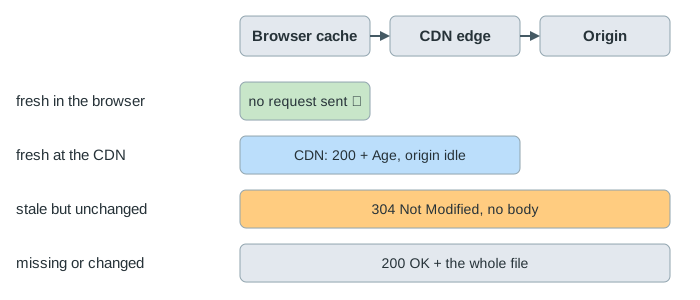
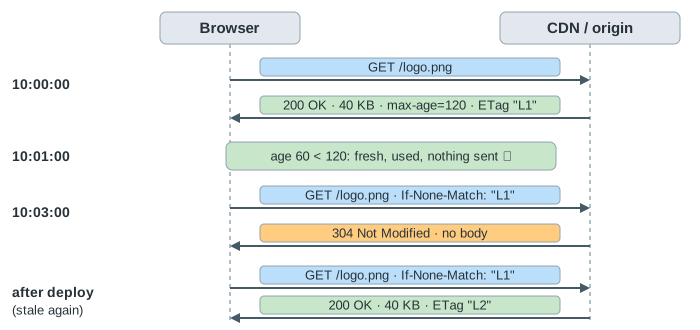
Cache-Control: max-age=120 says a copy is fresh for 120 seconds. While it is fresh, a cache uses it without asking anyone. The first time Alice loads /logo.png it comes from the origin; the second time her browser uses its copy and nothing goes on the wire. When Bob asks, his browser has nothing, but the CDN does, so the origin still sees only one request (Demo: max-age: browser hit, then CDN hit).
A copy's age travels with it. The CDN sends Age: 60 with a copy it has held for 60 seconds, and Bob's browser counts from there: that copy is fresh for only 60 more seconds, not 120 (Demo: Age travels). A CDN can be given its own, longer limit with s-maxage, which browsers ignore.
Revalidation: ETag, Last-Modified and 304
A stale copy is not thrown away. The next time it is needed, the cache sends a conditional request that says which version it has:
If-None-Match: "L1", repeating theETagthe server gave (an opaque version tag, often a hash of the content);If-Modified-Since: 09:30:00, repeating theLast-Modifieddate.
If the file has not changed, the server answers 304 Not Modified with headers and no body, and the copy is fresh again. On the canvas Alice's stale copy goes to the CDN, whose own copy is stale too, so the CDN revalidates with the origin first; then it answers Alice with a 304 of its own (Demo: expired: If-None-Match → 304). A 304 still costs a round trip, but not the bytes. ETag is the stronger validator: Last-Modified has one-second resolution and changes when a file is touched without changing.
no-cache, no-store, private
The names are confusing. no-cache does not mean "don't cache": it means "keep a copy, but check it with the server before every use". It suits HTML pages that must always be current but rarely change: every load costs a 304, not the page (Demo: no-cache + Last-Modified: always ask). no-store is the one that means "never keep it", for responses with personal or secret data; every request then goes all the way to the origin (Demo: no-store: every request reaches the origin).
| Header | Browser keeps it? | CDN keeps it? | Asks the server before use? |
|---|---|---|---|
max-age=120 | yes | yes | only after 120 s |
s-maxage=600 | (ignored) | yes, 600 s | CDN: after 600 s |
no-cache | yes | yes | every time |
private, max-age=60 | yes | no | after 60 s |
no-store | no | no | always a full request |
Deploys and cache busting
A deploy changes only the origin. Nobody tells the caches, so a copy that is still fresh keeps showing the old version until its max-age runs out (Demo: deploy while cached). Then revalidation finds a different ETag and the whole new file comes down. Two common answers: give HTML pages no-cache so they are always checked, and give scripts, styles and images a new name per version (app.3f9a.js) with a very long max-age and immutable; a new page simply points at new names. A CDN can also be told to drop a path (invalidation), as on the CDN and Route 53 page.
See also how a CDN and Route 53 work (edge locations, regional caches, invalidation), cache strategies (an application cache in front of a database), an HTTP connection and forward vs reverse proxy (where shared caches sit).
What the page leaves out
One CDN edge and no latency: requests take no time, and TCP, TLS and keep-alive are left out. It leaves out Expires and heuristic freshness when no header is given, stale-while-revalidate and stale-if-error, must-revalidate, Vary and the cache key, weak ETags (W/"..."), the browser's memory cache and back/forward cache, service workers, and how browsers treat the reload button.