The idea: keep copies near users, and let DNS send users to them
A web site lives on an origin: servers in one or two data centers. A user on the other side of the world pays for the distance on every round trip: 200 ms or more from Hanoi to Virginia. A CDN (content delivery network) such as Amazon CloudFront runs hundreds of edge locations (also called POPs, points of presence) close to users. Each one keeps copies of the site's files, so most requests end a few milliseconds from the user. But how does a browser find the nearest edge location? Through DNS. Amazon Route 53 is the DNS service that answers for the site's domain, and the answer it gives depends on who is asking.
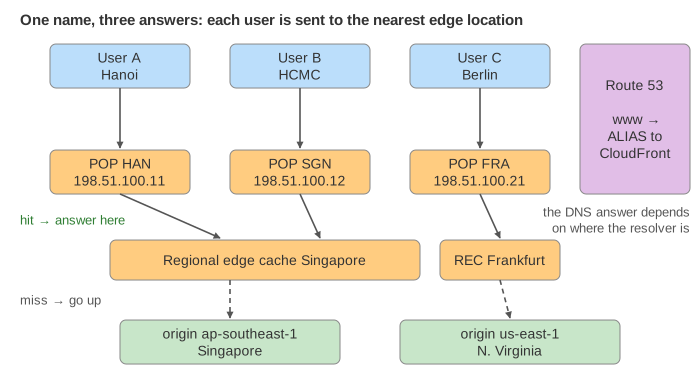
On the canvas, three users sit at the top, each with the DNS resolver of their internet provider. Below are three CloudFront
edge locations (Hanoi, Ho Chi Minh City, Frankfurt), then two regional edge caches (Singapore, Frankfurt), then
the two origins in AWS regions ap-southeast-1 and us-east-1. Route 53 is on the right. Every cache shows
what it holds, how old each copy is, and the DNS answer it has cached for the origin. The line under the drawing gives the last
response with its X-Cache header and its latency, added up hop by hop.
Route 53: the authoritative DNS for the domain
Route 53 holds the hosted zone example.com: the list of records for the domain. A resolver that
wants www.example.com ends up asking Route 53's name servers (see How a DNS Name Is
Resolved for the root and .com steps before that). Those name servers are anycast: the same
address is announced from many places, so the question reaches a nearby Route 53 location.
www.example.com is an alias record pointing at the distribution d111abcdef8.cloudfront.net.
An alias works like a CNAME, but Route 53 resolves it itself and returns the final addresses, it works at the top of the zone
(example.com itself, where a CNAME is not allowed), and alias queries to AWS resources cost nothing. CloudFront picks
the addresses: those of the edge location nearest the resolver that asked. So user A's resolver in Hanoi gets the HAN
edge location, and user C's resolver in Berlin gets FRA, for the same name (Demos 1 and 3). The answer has a
TTL of 60 s: the resolver keeps it that long.
Routing policies
The origin has its own name, origin.example.com, with one record per region. A routing policy tells
Route 53 which record to answer with. Here the question comes from a CloudFront cache, so the policy decides which region serves
that cache.
| Policy | Answers with | Typical use |
|---|---|---|
| simple | the record's values, always | one server |
| weighted | a record picked at random by weight (here 30 / 70) | moving traffic to a new region or version step by step |
| latency | the region with the lowest latency from the asker's network | active-active regions |
| failover | PRIMARY while its health check passes, otherwise SECONDARY | active-passive disaster recovery |
| geolocation | the record for the asker's country or continent | local content, legal limits |
| multivalue | up to 8 healthy records at random | simple client-side spreading |
The page models the first four. With latency, the Singapore regional cache gets ap-southeast-1
(2 ms against 220 ms), and the Frankfurt one gets us-east-1 (90 ms against 160 ms) (Demo 3). With
weighted, notice that the pick happens once per DNS answer, not per request: every request inside the 60 s TTL
goes to the same region, so a 30 / 70 split only shows up over many resolvers and many TTLs (Demo 8).
Health checks, and why DNS failover takes time
Route 53 health checkers probe each origin every 10 s (RequestInterval). After 3 failures in a row
(FailureThreshold) the record is unhealthy and Route 53 stops answering with it; after 3 passes it
is healthy again. If every record is unhealthy, Route 53 answers as if all were healthy, because some answer beats none.
DNS failover is not instant. First the checkers need up to 30 s to notice. Then every cache that already holds the old answer
keeps using it until its TTL runs out, up to 60 s more. During that time requests that reach the origin fail with 504
(Demo 7). Content that is still fresh in a cache keeps being served the whole time: a CDN also hides short origin outages.
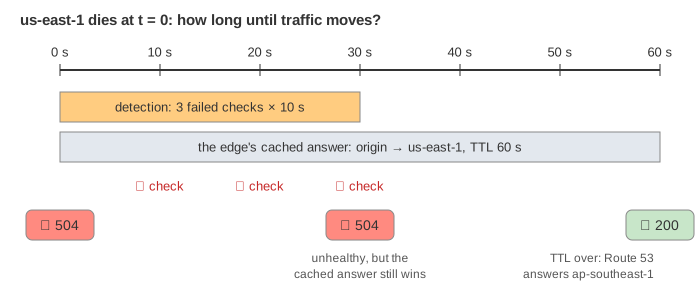
That is why failover records use short TTLs, and why CloudFront also has origin groups: the cache itself retries a second origin when the first returns an error, without waiting for DNS.
CloudFront: edge locations, regional edge caches, cache key
A request lands on an edge location, which ends the TLS connection there. It looks up the cache key: by default the host and path (the cache policy can add query strings, headers or cookies, but every extra part means fewer hits). Then:
- Hit: a fresh copy is there. The answer comes back in one short round trip (Demo 2, 4 ms).
- Miss: the edge location asks its regional edge cache, a bigger cache shared by the edge locations of a region. If that one has it, the origin is not asked (Demo 2: user B in Ho Chi Minh City gets the logo user A already fetched through Hanoi, 29 ms).
- Only a miss at both goes to the origin (Demo 1: 4 + 40 + 2 + 50 = 96 ms).
The response says what happened in the X-Cache header: Hit from cloudfront, Miss from cloudfront,
RefreshHit from cloudfront or Error from cloudfront, and Age tells how many seconds ago the
origin produced the copy.
Freshness, revalidation and invalidation
The origin decides how long a copy may be used: Cache-Control: max-age=60 for the page, a day for the logo.
A copy is fresh while its Age is below max-age. The age travels with the copy, so a copy that waited 20 s in
the regional cache has only 40 s left at the edge.
An expired copy is not thrown away. The cache sends a conditional request with the copy's ETag
(If-None-Match: "v1"). If nothing changed, the origin answers 304 Not Modified with no body, and the copy is
fresh again: a RefreshHit (Demo 4).
| X-Cache | Meaning | Origin work |
|---|---|---|
| Hit | fresh copy at the edge location | none |
| RefreshHit | expired copy, revalidated, unchanged | a 304, no body |
| Miss | no usable copy at the edge (maybe one at the regional cache) | none, or a full 200 |
| Error | the origin could not be reached or failed | none |
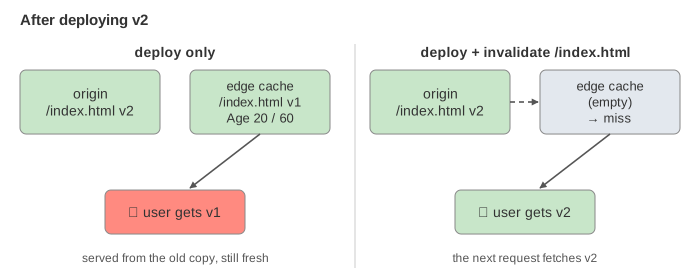
The flip side: after a deploy, users keep getting the old copy until it expires. To push the change now, you
invalidate the path (aws cloudfront create-invalidation --paths /index.html), which removes it from every
cache (Demo 5). For files such as scripts and images the usual answer is a new name per version
(app.3f9a.js) with a long max-age, so nothing ever needs invalidating.
Dynamic content
A shopping cart is different for every user, so /api/cart answers Cache-Control: no-store and its cache
behavior uses the CachingDisabled policy. The edge location skips the regional cache and goes straight to the origin,
every time (Demo 6, 89 ms). The CDN still helps: the TLS handshake ends 4 ms from the user instead of 35 ms or more, and
the long way to the region runs over the AWS network on connections the edge keeps open.
See also Load Balancer: L4 vs L7 for what sits behind the origin address, Cache Strategies for caching inside an application, and How an HTTP Connection Is Established for one connection in detail. Canary and Blue/Green Deployments shows weighted routing used to release a new version, and why a DNS rollback is slow.
See HTTP caching for max-age, Age, ETag/Last-Modified revalidation, no-cache and no-store, header by header, with a browser cache in front of the CDN.
What the page leaves out
- How anycast and BGP carry a packet to the nearest location (see Anycast and BGP), and EDNS Client Subnet, which lets the DNS see the user's network instead of the resolver's.
- Root and
.comlookups (assumed cached), DNSSEC, and the browser's and the OS's own DNS caches. - Geolocation, geoproximity, multivalue and IP-based routing; Route 53 health checks of other health checks (calculated).
- CloudFront origin groups, Origin Shield,
stale-while-revalidateandstale-if-error, signed URLs and cookies, Lambda@Edge and CloudFront Functions, compression and HTTP/3. - Real latencies vary; the numbers here are fixed so every demo gives the same result.