The idea: the same relay, on opposite sides
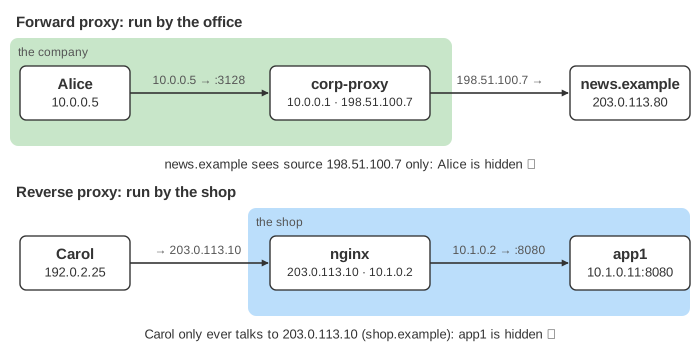
A proxy is a program that accepts your connection, opens a new connection of its own to the next machine, and copies the request and the reply across. Because the second connection starts at the proxy, the far side always sees the proxy's address as the source, never yours. A forward proxy and a reverse proxy are the same machine in that sense. What differs is whose side it is on. The top lane on the canvas is an office whose employees reach the Internet through the company's proxy; the bottom lane is a shop whose visitors reach its apps through the shop's proxy. Every Send runs the same request through both, one message per step.
Forward proxy: works for the clients
A forward proxy is run by the clients' side: a company, a school, an ISP. The client knows it is there, because it is configured to use it (a proxy setting, a PAC file, or WPAD). Every request leaves the network through it, so it is the place to log who went where, block sites (an ACL on the host name), and, for plain HTTP, cache pages for everyone. A plain HTTP request to a proxy carries the whole URL, GET http://news.example/logo.png, so the proxy can read and cache it (Demo: cache over plain HTTP).
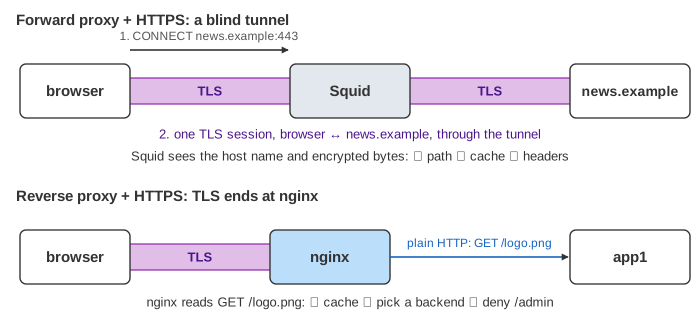
HTTPS changes this. The browser sends only CONNECT news.example:443, the proxy answers 200 Connection established, and from then on it copies encrypted bytes it cannot read. It still sees the host name, so it can still block games.example, but it cannot see the path, cannot cache and cannot add headers (Demo: one HTTPS page through each, Demo: office: two people, one blocked site). Companies that want more install their own root certificate on every laptop and decrypt the traffic ("TLS inspection"); this page leaves that out.
Reverse proxy: works for the site
A reverse proxy is run by the site. The client does not know it is there: DNS gives the proxy's address for shop.example, and the client thinks it is talking to the server. Behind it, the real servers sit on a private network the Internet cannot reach. Because the proxy holds the site's certificate, TLS ends there (TLS termination) and it reads every request. That lets it pick a backend (load balancing, Demo: TLS termination + load balancing), serve repeated files from its cache (Demo: cache /logo.png over HTTPS), refuse paths such as /admin, and speak plain HTTP to the apps. nginx, HAProxy, Envoy, Traefik and every CDN edge are reverse proxies.
X-Forwarded-For: a leak on one side, a feature on the other
Since the far side only sees the proxy's address, proxies can add a header with the original one: X-Forwarded-For: 192.0.2.25 (or the standard Forwarded: for=192.0.2.25, RFC 7239). Behind a reverse proxy that is what you want: the app needs the visitor's address for logs and rate limits, and in nginx you add it with proxy_set_header X-Forwarded-For $proxy_add_x_forwarded_for;. From a forward proxy the same header leaks the employee's address to every site, which defeats the point. Squid adds it by default (forwarded_for on); forwarded_for delete removes it. Over HTTPS a forward proxy cannot add it at all (Demo: X-Forwarded-For: leak vs feature).
Each proxy appends to the header, so it can hold a list. Anyone can send a fake first entry, so an app must trust only the entries added by its own proxies: count from the right (nginx real_ip_header with set_real_ip_from).
Which one?
| Forward proxy | Reverse proxy | |
|---|---|---|
| Run by | the clients' side (office, school, ISP) | the site |
| Client knows about it | yes, it is configured | no, it looks like the server |
| Hides | the clients from the sites | the backends from the clients |
| HTTPS | CONNECT tunnel: sees the host only | terminates TLS: sees everything |
| Typical jobs | egress filtering, logging, shared cache, one exit address | TLS, load balancing, caching, path rules, compression, DDoS shield |
| X-Forwarded-For | usually removed (privacy) | usually added (the app needs it) |
| Examples | Squid, corporate web gateways, Tor exits | nginx, HAProxy, Envoy, CDNs, API gateways |
See also how nginx handles a request, API gateway (a reverse proxy with auth and routing rules), load balancer, NAT (rewrites addresses in packets instead of opening a new connection) and VPN (hides your address like a forward proxy, but for all traffic, one layer down).
Which responses a proxy may keep, and for how long, is set by Cache-Control; see HTTP caching.
What the page leaves out
One request at a time, with TLS shown as single messages: the real handshake, TCP setup and keep-alive connections are left out. It leaves out TLS inspection by forward proxies, transparent (intercepting) proxies that clients are not configured for, SOCKS proxies, PAC/WPAD discovery, proxy authentication (407), cache validation with ETags, health checks and other load-balancing algorithms, and the PROXY protocol that passes the client address at the TCP level.