The idea: a proxy you install in the browser
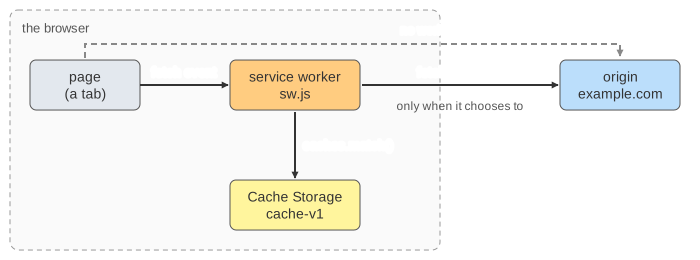
A service worker is a JavaScript file that the browser runs on its own thread, between a site's pages and the network. Once it controls a page, every request the page makes (the page itself, scripts, images, fetch() calls) first fires a fetch event in the worker. The worker can answer from Cache Storage, a set of named caches it fills itself, go to the network, or both. That is how a progressive web app opens with no network at all: offline first. On the canvas, one tab of example.com, its worker and Cache Storage live in the browser; the origin is across the network.
Register, install, activate
The first visit always comes from the network: there is no worker yet. The page's script calls navigator.serviceWorker.register('/sw.js'). The browser downloads sw.js and runs its install event, where the worker precaches the app shell with caches.open('cache-v1').addAll(['/index.html', '/app.js']). If any file fails, the whole install fails. Then activate runs (the place to delete old caches) and clients.claim() lets the worker take over the tab that is already open. On the next load the page and its script come from the cache, and with the network off the site still opens (Demo: first visit installs, second visit comes from the cache, Demo: offline first). With no worker, an offline visit just shows the browser's error page (Demo: offline on the very first visit).
A worker controls the pages in its scope, by default the folder sw.js is served from. It needs HTTPS (or localhost), has no access to the DOM, and the browser stops it when it is idle and starts it again for the next event, so it must not keep state in global variables.
Fetch strategies
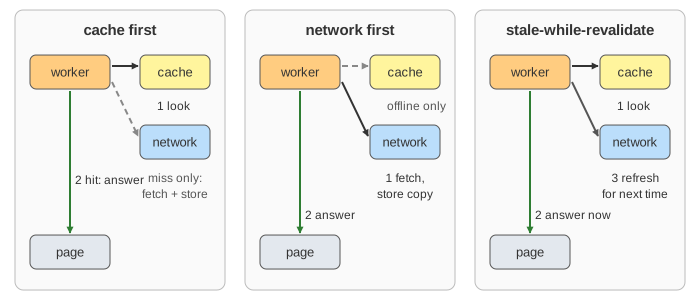
The fetch handler decides, request by request, where the answer comes from. Here the shell files are always cache first, and the dropdown picks the strategy for the API file /data.json:
| Strategy | Online | Offline | Good for |
|---|---|---|---|
| cache first | cache if it has it, else network and store | cache, or an error if never fetched | versioned scripts, fonts, images |
| network first | network, store a copy | the last copy from the cache | data that must be current |
| stale-while-revalidate | cache now, refresh the cache in the background | cache now; the refresh fails quietly | avatars, feeds, data that can be one visit old |
Cache first never asks again: after a deploy the page keeps getting the old /data.json (Demo: cache first: fast, but old after a deploy). Network first gets the new version at once and falls back to the cache when offline (Demo: network first). Stale-while-revalidate is one visit behind: the fetch right after a deploy still shows v1, but it has put v2 in the cache for the next one (Demo: stale-while-revalidate).
Updates and the waiting worker
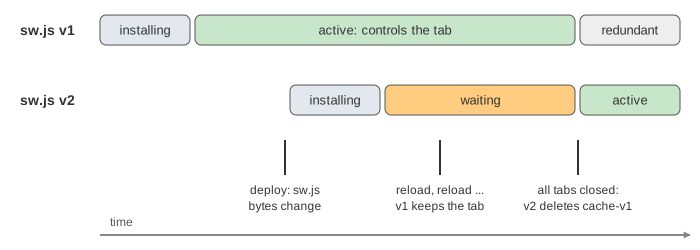
On every navigation the browser fetches sw.js again and compares the bytes. A changed file is a new worker: it installs next to the old one, into its own cache-v2, and then waits. While the old worker controls any tab, the new one does not run, so one page never mixes two versions. A reload is not enough: the new page is created before the old one is gone, so the old worker always has a client. Only when every tab is closed does v2 activate, delete cache-v1 and serve the new shell (Demo: an update waits until every tab is closed). Sites that want the update at once call self.skipWaiting() in install and usually show a "new version, reload" banner.
See also HTTP caching (the browser's own cache, which a service worker sits in front of), cache strategies (the same trade-offs for an application cache in front of a database), the browser event loop and how a browser renders a page.
What the page leaves out
One tab, one worker per version and no timing. It leaves out the HTTP cache under the worker, skipWaiting() as a control, navigation preload, background sync and push messages, the Cache Storage quota and eviction, opaque cross-origin responses, the 24-hour update check for long-running pages, offline fallback pages, and libraries such as Workbox that write these strategies for you.