The idea: a chain of signatures up to a root you already trust
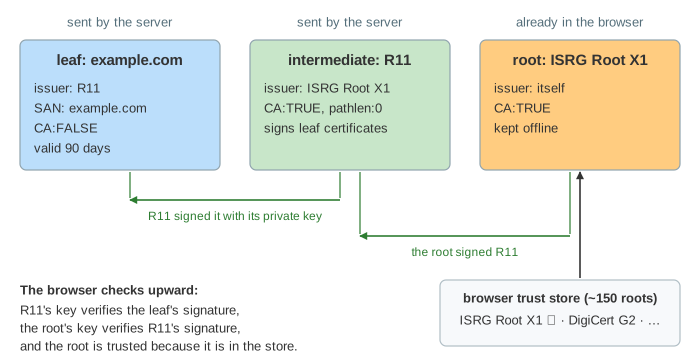
A certificate says "this public key belongs to example.com", and it is signed by an issuer. The browser cannot know every site's key, but it ships with a short list of root certificates, its trust store (about 150 roots). A site's certificate is trusted if it leads, signature by signature, to one of those roots: the leaf (the site) is signed by an intermediate, and the intermediate by the root.
The canvas has the server on the left, the browser in the middle and the certificate authority (Let's Encrypt, with its real intermediate R11 and root ISRG Root X1) on the right. Below is the chain the browser builds, with one row per check. Pick what the server does wrong in the first select, how revocation is checked in the second, whether an attacker blocks the CA in the third, and press Connect. Today is 2026-10-07.
Building the chain
The server sends its certificates in the TLS Certificate message: the leaf first, then the intermediates. The root is not sent; it would not help, since the browser trusts only its own copy. Starting from the leaf, the browser reads the issuer name and looks for a certificate with that subject, first among the ones the server sent, then in its trust store. A root found in the store ends the chain: it is the trust anchor.
The most common setup mistake is a server that sends only its leaf (cert.pem instead of fullchain.pem). The issuer R11 is then nowhere, and the chain cannot be built (Demo 2: server forgot the intermediate). Some browsers hide this by caching intermediates or downloading them from the URL in the certificate (AIA fetching), so the site works in one browser and fails in curl. A certificate that names itself as its issuer is self-signed: fine as a root in the store, rejected anywhere else (Demo 5).
What is checked on every certificate
Once the chain is built, the browser checks it from the root down. One failed check and there is no padlock:
| check | on which certificates | what it means |
|---|---|---|
| signature | every one below the root | verifies with the issuer's public key: the issuer really signed it, and nothing was changed |
| validity dates | every one | today is between notBefore and notAfter |
basicConstraints CA:TRUE | every issuer | only a CA may sign certificates; pathlen:0 means no CA below it |
| subjectAltName (SAN) | leaf | the host name in the URL is in the list (*.example.com covers one label) |
| extended key usage | leaf | serverAuth: made for a TLS server |
| Certificate Transparency | leaf | carries SCTs: proof it was published in public logs |
| revocation | leaf (and intermediates, by pushed lists) | the CA has not cancelled it |
The basicConstraints check matters more than it looks. Anyone can buy a valid certificate for their own domain. If browsers did not check CA:FALSE, its owner could sign a certificate for bank.com with it, and the chain would verify signature by signature (Demo 6: a leaf used as a CA). Old Internet Explorer and iOS versions had exactly this bug.
Errors and what they mean
| what is wrong | OpenSSL says | Chrome shows | TLS alert |
|---|---|---|---|
| intermediate not sent | unable to get local issuer certificate | NET::ERR_CERT_AUTHORITY_INVALID | unknown_ca |
| self-signed / unknown root | self-signed certificate | NET::ERR_CERT_AUTHORITY_INVALID | unknown_ca |
| expired (or not yet valid) | certificate has expired | NET::ERR_CERT_DATE_INVALID | certificate_expired |
| wrong host name | hostname mismatch | NET::ERR_CERT_COMMON_NAME_INVALID | certificate_unknown |
| issuer is not a CA | invalid CA certificate | NET::ERR_CERT_INVALID | bad_certificate |
| revoked | certificate revoked | NET::ERR_CERT_REVOKED | certificate_revoked |
An expired certificate (Demo 3) is usually a renewal job that stopped. A wrong host name (Demo 4) is a certificate for example.com served on api.example.com. Note that the clock matters: a client with a wrong date rejects good certificates.
Revocation: CRL, OCSP and stapling
A certificate stays valid until notAfter, even if its private key is stolen. The owner then asks the CA to revoke it, and the CA publishes that. There are three ways for a browser to find out:
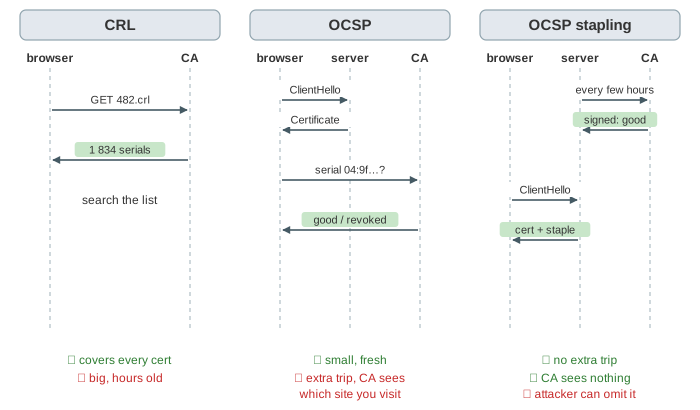
- CRL (certificate revocation list): the CA's signed list of revoked serial numbers, at the URL in the certificate. Complete, but large and refreshed only every few hours or days (Demo 7: the CRL has it).
- OCSP: ask the CA's responder about one serial; it answers
good,revokedorunknown, signed. Small, but an extra round trip on the critical path, and the CA sees every site each user visits. - OCSP stapling: the server fetches its own OCSP answer every few hours and sends it in the handshake (
CertificateStatusin TLS 1.2, an extension of the certificate entry in TLS 1.3). The answer is signed by the CA, so the server cannot fake it. No extra round trip, no privacy leak (Demo 1).
Soft-fail and must-staple
What if the CA does not answer? Blocking every site whenever an OCSP server is slow would break the web, so browsers soft-fail: they connect anyway. But the attacker who stole the key is often the one on the network path, and can simply drop the packets to the CA. The revoked certificate is then accepted (Demo 8: OCSP blocked). Stapling alone does not fix this: the attacker leaves the staple out.
Must-staple is an extension in the certificate itself (TLS Feature, status_request). It tells the browser: this certificate is never used without a staple. A missing staple is then a hard failure, and the CA does not need to be reached at all (Demo 9). Firefox enforces it; Chrome does not.
Because live checks are weak, browsers now push revocation data to themselves instead: Chrome's CRLSets and Firefox's CRLite download compressed lists of revoked certificates in the background. Let's Encrypt ended its OCSP service in 2025 and publishes CRLs only, and certificate lifetimes keep shrinking (90 days now, 47 days planned by 2029) so a stolen key is useful for less time.
Certificate Transparency
Revocation only helps once someone notices a bad certificate. Certificate Transparency makes every publicly trusted certificate visible: before issuing, the CA submits it to several public, append-only logs and gets back Signed Certificate Timestamps (SCTs), which go into the certificate. Browsers require SCTs, so a certificate cannot be issued in secret. Site owners watch the logs (for example on crt.sh) for certificates for their domains they did not ask for.
See How an HTTPS Connection Is Established for the whole handshake around this step, and Digital Signatures for how one signature is made and verified.
Client certificates are shown on Mutual TLS.
What the page leaves out
Cross-signed roots and several possible chains (path building that tries alternatives), name constraints, key usage bits, policy OIDs, wildcard matching rules, Extended Validation, the OCSP responder's own certificate, CRL partitioning and delta CRLs, how CRLSets and CRLite are built, client certificates (mutual TLS), and the CA/Browser Forum rules that decide which roots go into a trust store.