The idea: one main thread, many queues
A web page's JavaScript runs on one thread, the renderer's main thread. The same thread also runs the HTML parser, style, layout and paint. While your code runs, nothing else on that thread can: not a click handler, not a timer, not the next frame. The event loop decides what the thread does next.
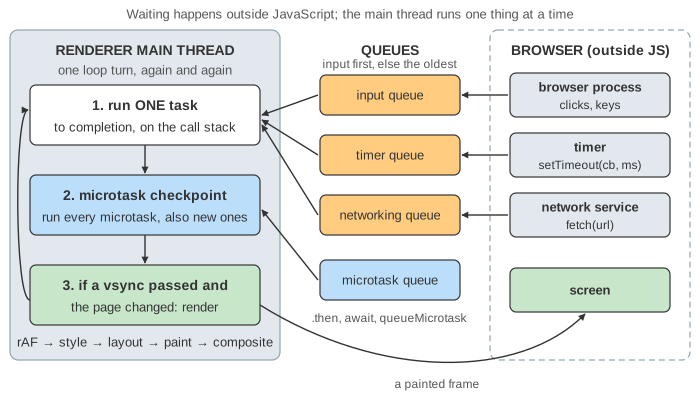
The canvas has four bands. At the top left is the main thread: the code, the call stack and the console. At the top right is what waits outside it: the timer list, the network service and the screen the user sees. Below are the queues, then the rendering pipeline with a frame strip: time runs left to right, a grey tick every 16 ms marks a vsync, ✓ is a painted frame and ✗ a dropped one.
Run to completion and the call stack
A task runs from start to end without being interrupted. Functions it calls go onto the call stack; when the stack is empty again, the task is over. Only then can the event loop pick something else. In Demo 1: the classic order the main script logs A and B first, even though a timer and two microtasks were queued between them.
Web APIs and task queues
setTimeout, fetch and event listeners are Web APIs: the browser does the waiting, not JavaScript. When the wait is over, it puts a task into a task queue. The event loop takes one task per turn. When several queues have work, Chrome runs input first; the HTML standard leaves that choice to the browser.
| API | Where it waits | Queue it posts to |
|---|---|---|
setTimeout(cb, ms) | the timer list, until t + ms | timer task queue |
fetch(url) | the network service (another process) | networking task queue |
addEventListener('click', cb) | the element's listener table; the click comes from the browser process | user-interaction (input) queue |
requestAnimationFrame(cb) | the rAF list (not a task queue) | runs in the next frame, before style |
A timer's delay is a minimum. The task only runs when the main thread is free. Nested timers are also clamped: from the 5th level of setTimeout inside setTimeout, the delay is at least 4 ms. Demo 7 shows that clamp in its second run.
Microtasks
After every task, the browser runs a microtask checkpoint: it runs every microtask in the queue, including ones added while it runs. Only an empty queue ends the checkpoint.
| Source | Becomes a microtask when |
|---|---|
promise.then(cb), code after await | the promise is resolved |
queueMicrotask(cb) | at once |
MutationObserver | the observed DOM changed |
That is why promise and micro print before timeout in Demo 1, and why in Demo 4: fetch the response task and both .then callbacks all run at t = 30 ms, one right after the other.
Rendering: rAF, style, layout, paint, composite
About every 16.7 ms (60 Hz) the display sends a vsync, and the main thread gets a rendering opportunity. If the page changed, it runs the requestAnimationFrame callbacks, then Style (which CSS rules apply), Layout (sizes and positions), Paint (draw commands) and Composite (the compositor thread and the GPU put the layers on screen). The page models a vsync every 16 ms.
Writing to the DOM changes the DOM at once, but the screen only changes at Paint. In Demo 2 the click moves the box at t = 5 ms; the user sees it move at t = 16. In Demo 3: three moves, one frame one task sets left to 100, 200 and 300: one paint shows 300 and the screen never shows 100 or 200. The same three moves in three timer tasks give three frames.
Long tasks, INP and how to split work
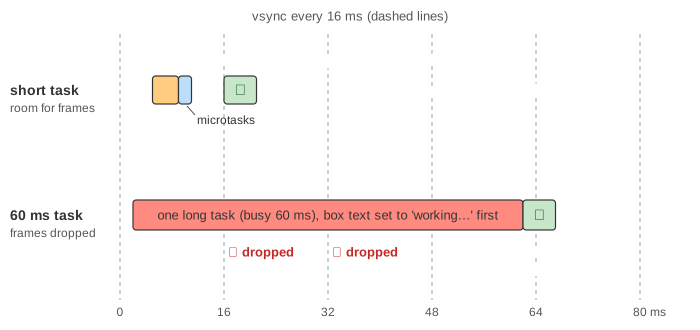
A task longer than 50 ms is a long task. While it runs, clicks wait in their queue and vsyncs pass with no frame. In Demo 5: a long task drops frames the click handler sets the text to working… and then runs for 60 ms. The user never sees working…: frames 16 and 32 are dropped, frame 48 is painted late at 62, and a second click from t = 10 ms waits until t = 62. That delay between a click and the next frame is what INP (Interaction to Next Paint) measures.
The fix is to give the thread back. The second run does the same work as four 15 ms chunks, each scheduled with setTimeout(chunk, 0). A frame gets through after each chunk that crossed a vsync (t = 17, 32 and 62), nothing is dropped, and the second click runs at t = 17, because input goes first. scheduler.yield() does the same with less delay; work that needs no DOM can move to a Web Worker, which has its own thread.
Microtasks do not help here. The checkpoint only ends when the queue is empty, so a promise chain that keeps queuing work blocks frames just like one long task. In Demo 7: microtasks can starve the page 40 promise steps of 1 ms each drop frame 16 and make frame 32 late at t = 40; the same 40 steps in timer chunks of 8 let every frame through on time.
Loading scripts: classic, async, defer, module
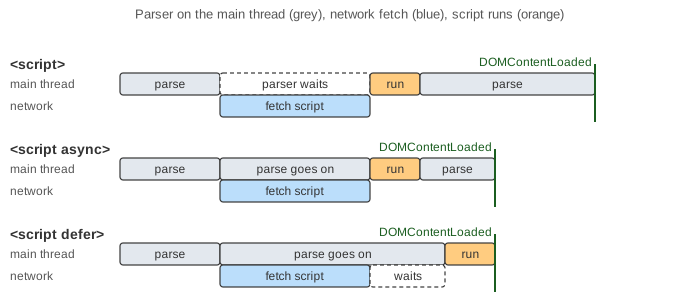
The HTML parser also runs on the main thread, in chunks. A <script> tag changes what it does:
| Tag | Fetch | Runs | Blocks the parser? |
|---|---|---|---|
<script src> (classic) | when the parser reaches it | as soon as it arrives | yes, until fetched and run |
<script async src> | in parallel | as soon as it arrives, in any order | no, only pauses it while running |
<script defer src> | in parallel | after parsing, in document order, before DOMContentLoaded | no |
<script type="module"> | in parallel, with its imports | like defer (or like async with the attribute) | no |
In Demo 6 the parser stops at a.js from t = 4 to 28 ms. The screen still gets a first paint at t = 16 with the heading parsed so far. b.js (async) arrives at 42 and runs at 48, between two parser chunks. c.js (defer) arrived at 36 but waits until parsing ends at 60. The console shows a, b, c, DOMContentLoaded.
Browser vs Node.js
Node.js has an event loop too, with different queues. See The Node.js Event Loop for its libuv phases.
| Browser (HTML standard) | Node.js (libuv) | |
|---|---|---|
| Tasks | task queues (input, timers, networking, …); one task per loop turn | six phases; each runs all of its ready callbacks |
| Microtasks | promise jobs, queueMicrotask, MutationObserver, after every task | process.nextTick queue first, then promise jobs, after every callback |
| Rendering | rAF, style, layout, paint at vsyncs | none |
| Waiting | in other threads and processes of the browser | epoll / kqueue / IOCP in the poll phase, plus a thread pool |
This page shows when a script's code gets the main thread. What V8 does with that code once it runs (parsing, bytecode, the optimizing compilers) is on How V8 Runs JavaScript. Frameworks batch DOM writes for the same reason as Demo 3; see Virtual DOM diffing. Which scripts may run at all is a security question; see XSS and Content Security Policy.
A long task blocks the event loop because it is scheduled cooperatively; see Preemptive vs Cooperative scheduling.
See also Server-side vs Client-side Rendering for how a page's HTML, app.js and data arrive, and the hydration gap before the page is interactive.
What the page leaves out
A real browser has many renderer processes (site isolation), each with compositor and raster threads; here the compositor is one step. Idle callbacks (requestIdleCallback), the event loops of Workers, task priorities other than "input first", scheduler.postTask, background-tab throttling and the preload scanner (which would fetch b.js and c.js while the parser waits for a.js) are left out. Rendering takes no time in the model, JavaScript takes none except busy(n) and the scripted parse and script costs, and a resolved promise adopted by .then takes one microtask instead of the real two or three.