The idea: one plug between agents and tools
An agent such as Claude Code can only do what its tools allow (see How an AI Agent Works). Its built-in tools read files and run commands. To query a database, file a GitHub issue or search a company wiki, someone has to write a tool for it. The Model Context Protocol (MCP) makes that tool a separate program, an MCP server, that any agent can plug in. The agent side, the host, speaks one protocol to all of them.
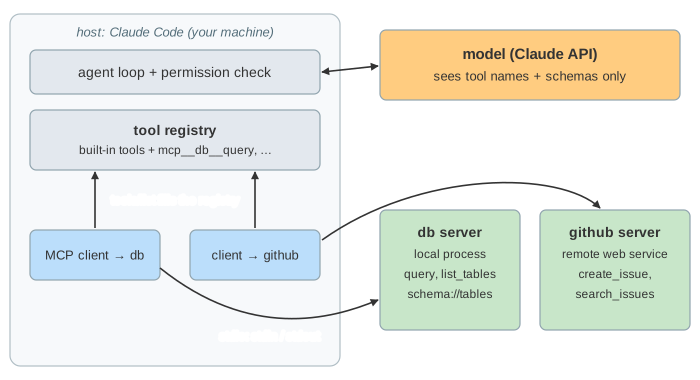
On the canvas, the host is on the top left: a terminal, the agent loop, the permission check, the tool registry and one client per server. The model is on the right. Below are the two servers from .mcp.json: db, a local program, and github, a remote one. At the bottom is every JSON-RPC message that passes between them. Run a demo, or pick an event and press Do, then pick a task and press Send.
Hosts, clients, servers, and what a server offers
| part | what it is | on the page |
|---|---|---|
| host | the app with the model in it | Claude Code |
| client | one connection from the host to one server | client → db, client → github |
| server | a program that offers capabilities | db-mcp, the github server |
A server offers three kinds of things. Tools are actions the model can call (query, create_issue). Resources are data the host can read and put into the context (schema://tables), picked by the user or the app, not the model. Prompts are ready-made templates the user can run (explain_query). The client can offer things to the server too: roots (which folders it may use), sampling (ask the host's model a question) and elicitation (ask the user for input).
JSON-RPC 2.0 and the two transports
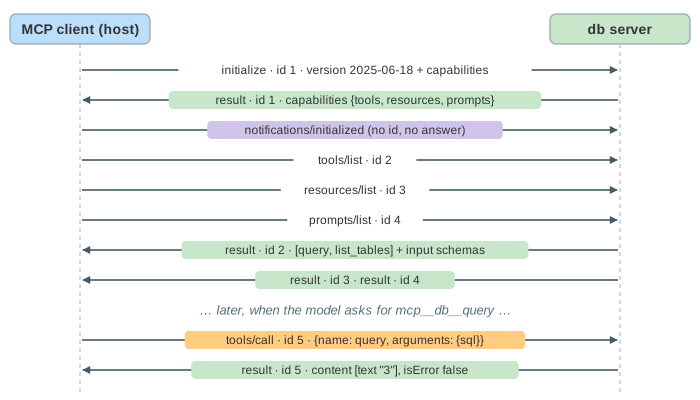
Every message is JSON-RPC 2.0. A request has an id and a method, and gets exactly one response with the same id: a result or an error. A notification has no id and gets no answer. Because of the ids, several requests can be open at once.
| stdio | Streamable HTTP | |
|---|---|---|
| server is | a child process the host starts | a web service somewhere |
| client → server | one JSON line on the server's stdin | HTTP POST to one URL, e.g. /mcp |
| server → client | lines on the server's stdout | the POST's response, or an SSE stream |
| session | the process lifetime | an Mcp-Session-Id header |
| auth | none needed, it runs as you | OAuth 2.1 bearer token |
The handshake
A connection always starts the same way (Demo 1: connect). The client sends initialize with the protocol version it speaks (2025-06-18) and its capabilities. The server answers with its version, its name and its capabilities, for example {"tools": {"listChanged": true}}. The client then sends the notification notifications/initialized, and only after that the real requests: tools/list, resources/list, prompts/list.
From tool_use to tools/call
Every tool from tools/list goes into the host's tool registry as mcp__<server>__<tool>, with the server's description and JSON schema. The model gets it in the request like any built-in tool. It does not know MCP exists. When it answers with a tool_use for mcp__db__query, the host checks permissions, splits the name, and sends tools/call to the db client (Demo 2):
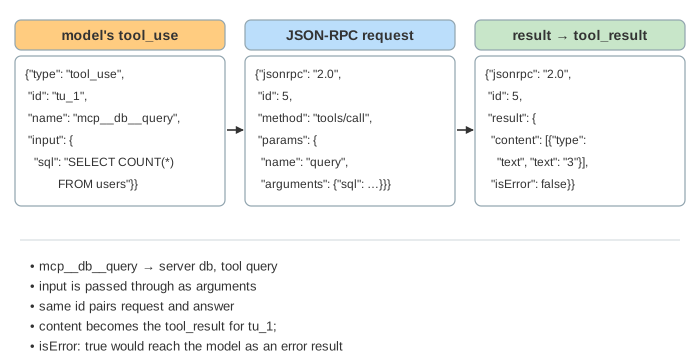
If no server is connected, there is no tool, and the model says it cannot help (Demo 8). The same tool over HTTP works the same way; only the transport differs (Demo 4).
Errors, crashes and timeouts
There are two kinds of failure. A tool error (bad SQL, a missing table) is a normal result with isError: true and a message. The model reads it and tries something else: in Demo 3 it lists the tables, finds purchases and queries that. A protocol error is a JSON-RPC error, or a broken connection. In Demo 6 the db process dies during the call. The client reads end-of-file on the pipe, fails the open request (-32000 Connection closed), and the server's tools leave the registry until you reconnect. A server that hangs instead runs into the host's tool timeout.
When the tool list changes
A server that said tools.listChanged at initialize may change its tools later. It sends notifications/tools/list_changed (over SSE for HTTP). The client runs tools/list again, and the next model request includes the new tool. In Demo 7 the first request has no add_label, so the model cannot add the label. After the notification it can.
Permissions and trust
An MCP tool runs with whatever access the server has: your files for a local server, your token for a remote one. So the host still asks before running it (Demo 5: you deny the call: no request reaches the server), and you can allow single tools by name, like mcp__db__list_tables here. Only install servers you trust. Their tool descriptions and results go straight into the model's context, so a malicious server, or malicious data it returns, can try prompt injection.
What the page leaves out
OAuth for remote servers, progress notifications and cancellation, paging (cursor) in long lists, resource subscriptions, sampling, roots and elicitation in action, structured tool output (structuredContent and outputSchema), the older HTTP+SSE transport, and how MCP output is limited to keep the context small. The model's answers are scripted, so every run is the same.