The idea: a model in a loop with tools
A coding agent such as Claude Code has two parts. The model (Claude, reached through an HTTP API) reads text and writes text. The harness (the Claude Code program in your terminal) keeps the conversation, sends it to the model, and runs the tools the model asks for: read a file, edit a file, run a command. An agent is these two in a loop. Call the model, run the tools it asked for, send back the results, call it again. The loop stops when the model answers with plain text and no tool request.
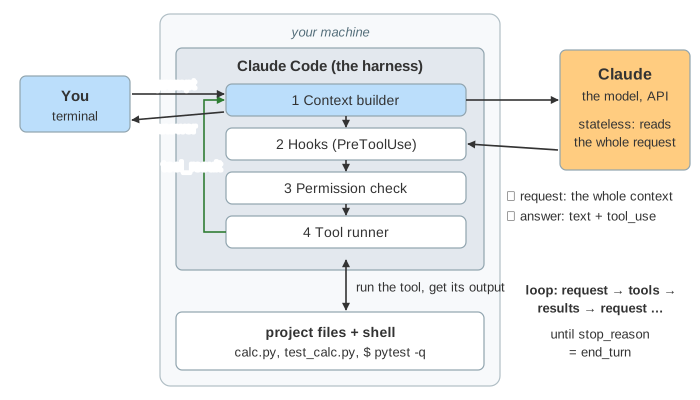
The canvas has five parts: your terminal, the harness with its four stages, the model, the project folder with a shell, and at the bottom the context window: everything the next request will contain. The sample project is a tiny calculator with a bug (add() returns a - b). Pick a task and press Send, answer a permission prompt with Allow or Deny, or run a demo.
The model is stateless: the context is the memory
The model keeps nothing between calls. Every request carries the whole conversation again, and the model's answer depends only on that request. So each turn the harness sends:
| part of the request | what it is | tokens on this page |
|---|---|---|
| system prompt | who the agent is, how to behave, the environment | 3 000 |
| tool definitions | name, description and JSON schema of every tool | 9 000 |
CLAUDE.md | your project notes, loaded at start ("Run tests with: pytest -q") | 200 |
| messages | your prompts, every assistant answer, every tool result, in order | grows each turn |
Watch the context window while a demo runs: every turn adds an assistant message and a tool result, and the next request is bigger than the last. If something is not in the context, the model does not know it. That is why CLAUDE.md exists, and why the agent reads a file before it edits it.
Tool use: tool_use and tool_result
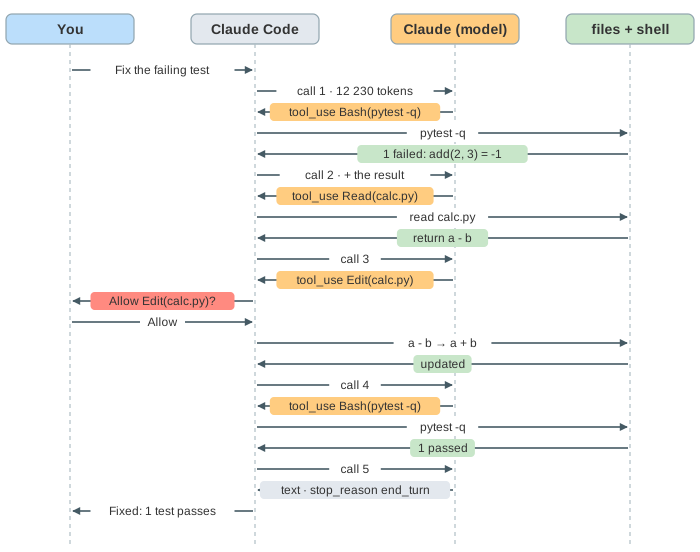
The model cannot touch your machine. It can only write a tool_use block naming a tool from the list it was given, with input that fits the tool's schema. The response ends with stop_reason: "tool_use". The harness runs the call and replies with a tool_result that carries the same tool_use_id. One round trip of Demo 1: fix a failing test:
assistant → {"type": "text", "text": "I'll run the tests first."}
            {"type": "tool_use", "id": "tu_1", "name": "Bash",
             "input": {"command": "pytest -q"}}
            stop_reason: "tool_use"

user      → {"type": "tool_result", "tool_use_id": "tu_1",
             "content": "F ... where add(2, 3) = -1\n1 failed"}
One response may hold several independent tool calls. The harness runs them all and sends all the results back in one message (Demo 2: three tool calls in one response: a Glob and two Reads, then one answer). Every tool_use gets exactly one tool_result, even a call that never ran.
Hooks and permissions: the harness is the gate
Before a tool call runs, the harness checks it twice. First the PreToolUse hooks: your own scripts, configured in settings, that see the tool name and input and can block the call (exit code 2) with a reason. Then the permission check: allow and deny rules (such as Bash(pytest:*)) and the permission mode. A call with no rule that allows it is shown to you in the terminal: Allow or Deny.
| mode | read-only tools | file edits | other commands |
|---|---|---|---|
default | run | ask you | ask you, unless an allow rule matches |
acceptEdits | run | run | ask you, unless an allow rule matches |
plan | run | denied | denied, except read-only ones |
bypassPermissions | run | run | run (only for sandboxes) |
A denied or blocked call does not stop the agent. It becomes a tool_result with is_error: true, and the model reads it like any other result. In Demo 3: you deny a command Claude stops and asks what to keep. In Demo 4: a hook blocks an edit the hook protects .env, and Claude changes config.py instead. In Demo 7: plan mode it runs the tests and reads the code, but the edit is denied, so it only tells you the fix.
Why tool results make it work
The model does not guess whether the fix worked. It runs the test, reads the output (where add(2, 3) = -1), reads the code, edits it, and runs the test again. Each result is new evidence in the context. Without the tools it would be a chatbot suggesting a fix. With them it can check its own work. The more a task can be checked (tests, a type checker, a build), the better an agent does on it.
The context window, prompt caching and compaction
The context window is a hard limit, here 200 000 tokens. Resending everything each turn sounds expensive, and two things help.
Prompt caching. Each request starts with exactly the same tokens as the previous one, plus a new tail. The API keeps the processed prefix for a few minutes, so those tokens are a cheap cache read and only the new tail is full price. The model panel shows the split on every call.
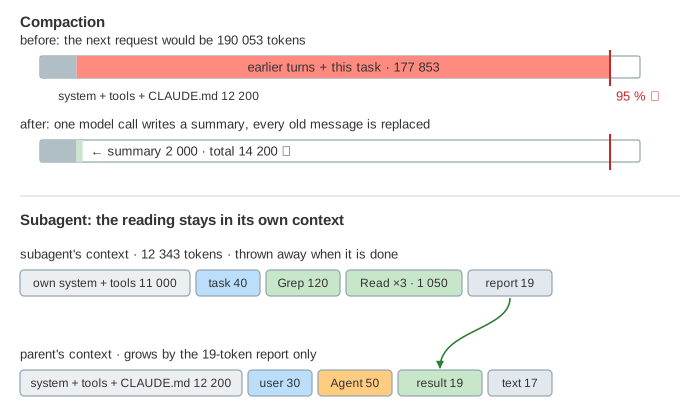
Compaction. When the next request would pass about 95 % of the window, Claude Code makes one extra model call that summarizes the conversation, then replaces every old message with that summary (Demo 5: the context fills up: 190 000 tokens become about 14 000). The loop goes on, but the details of earlier turns are gone. Only what the summary kept is left.
Subagents
The Agent tool starts a subagent: the same loop, with its own system prompt and an empty conversation holding only the task text. It searches and reads on its own, and its last text comes back to the parent as one tool result. The files it read never enter the parent's context (Demo 6: a subagent searches in its own context: it reads three files, the parent gets a one-line report). Use one for big searches whose details the main conversation does not need. Several subagents can run in parallel.
The same loop elsewhere
Other coding agents (Cursor's agent, GitHub Copilot's agent mode, OpenAI Codex) and agent frameworks (the Claude Agent SDK, which is the harness of Claude Code as a library) differ in tools, prompts and user interface, but the core is the same loop: a stateless model, a list of tools, a harness that runs them and keeps the context. To see what happens inside one model call (tokens, attention, choosing the next token), see How a Large Language Model Works. For another loop that waits on outside work and then continues, see the event loop.
What the page leaves out
Streaming (the answer arrives token by token, and tools can start before it ends), extended thinking blocks, MCP servers (tools from other programs, used the same way; see MCP), the todo list, retries and rate limits, PostToolUse and other hook events, sandboxing of commands, real token counts from a tokenizer, and the model's choices themselves: here they are scripted, so every run is the same. A real model may pick other tools or take more turns.