The idea: a page needs somewhere to go
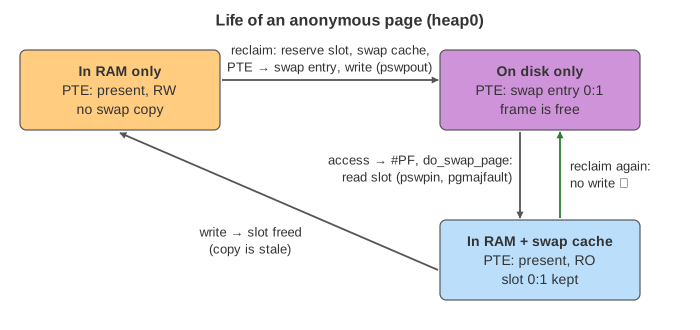
When RAM runs short, the kernel reclaims pages: it takes a frame away from a page that hasn't been used for a while and gives it to someone else. That only works if the page's data can be found again later. A file page has a home: its file. An anonymous page (heap, stack, anything from malloc) has no file behind it, so before its frame can be reused its bytes must be written to a swap slot. That is swap out. The page table entry then remembers the slot, and the next access to that address faults and reads the page back: swap in.
The canvas follows one process, app, with seven pages, on a machine with 6 frames of RAM and 6 swap slots. Press Reclaim to let kswapd free one page, pick a page and press Read or Write, or run a demo.
Reading the canvas
- Page table (top): one row per virtual page. PTE is what the entry holds: a frame number (present), a swap entry
0:n(swap type 0, slot n) or none. bits: P present, RW or RO, A accessed, D dirty. A purple row is in swap, a grey row is not in RAM. - Frames (middle): what each frame of RAM holds. Orange is anonymous, light blue a clean file page, darker blue a dirty one.
- The LRU list under the frames is in age order. Reclaim scans from the left. An A after the name means the accessed bit is set.
- The swap cache lists pages that are in RAM and also have a valid copy in a slot.
- Disk (bottom): the 6 swap slots and the two files
libc.so.6anddata.db. Pages fly between frames and disk on every write and read. /proc/vmstatcounts faults (pgfault,pgmajfault), pages swapped in and out (pswpin,pswpout) and pages reclaimed (pgsteal).
What reclaim does with each kind of page
Reclaim, whether by kswapd in the background or by a process itself (direct reclaim), takes the oldest page that wasn't used recently. What it does next depends on what is behind the page:
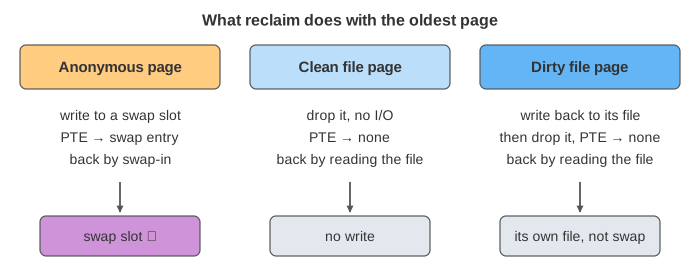
| Page | Reclaim | PTE after | Next access |
|---|---|---|---|
| anonymous, no swap copy | write to a new swap slot (pswpout) | swap entry | major fault, read the slot (pswpin) |
| anonymous, in swap cache | drop, no write: the slot is still exact | swap entry | major fault, read the slot |
| clean file page | drop, no write | none | major fault, read the file |
| dirty file page | write back to its own file, then drop | none | major fault, read the file |
So a machine with no swap can still reclaim page cache, but it can't reclaim any anonymous memory at all. In Demo: file pages, data.db is dirty and is written to data.db, libc is clean and just dropped, and when libc is used again it is read from libc.so.6: pswpout and pswpin don't move. For the page cache side see The Page Cache: read vs mmap.
Which page: the accessed bit
The CPU sets the accessed bit A in a PTE whenever the page is used. Reclaim checks it when it reaches a page: if A is set, the page was used since the last look, so the bit is cleared and the page gets another round (in the real kernel it moves to the active list). The first page with A clear is evicted. That is why libc, heap2 and stack, which start with A set, survive the first scans. The full Linux algorithm has an active and an inactive list for each of anonymous and file pages; see Paging and Page Replacement for FIFO, Clock and LRU.
Swap out, step by step
folio_alloc_swap()reserves a free slot, andadd_to_swap_cache()files the page in the swap cache under that slot.try_to_unmap()walks every PTE that maps the page (found through the reverse map) and replaces it with the swap entry. The TLB entries are flushed.pageout()callsswap_writepage(): the page is written to the slot.pswpoutcounts it.- When the write is done, the page leaves the swap cache and the frame goes back to the free lists.
The order matters: the page joins the swap cache before the PTE is changed, so a process that touches the address halfway through finds the page in RAM instead of reading a slot that isn't written yet (Demo: kswapd swaps out a cold heap page).
The swap entry in the PTE
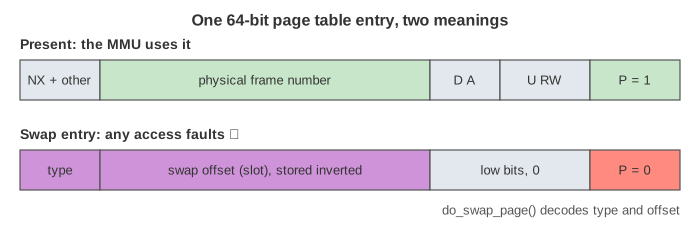
A swapped-out page has no frame, but its PTE is not empty. With the present bit clear, the MMU ignores the other bits, so Linux stores the swap location there: a type (which swap area, from swapon) and an offset (the slot number). On x86-64 the offset is stored inverted, so a stale entry can't point at real memory (a defence against the L1TF speculation bug).
Swap in: the major fault
When app touches a swapped-out address, the MMU sees present = 0 and raises a page fault. The handler finds a swap entry and calls do_swap_page():
- Look up the slot in the swap cache. A hit means the page is already in RAM: map it, done, a minor fault.
- On a miss, take a frame, add it to the swap cache under the slot, and read the slot with
swap_read_folio(). The process sleeps on the disk read: a major fault (pgmajfault,pswpin). - Point the PTE at the frame. After a read fault the page is mapped read-only and keeps its slot; after a write fault it is writable and the slot is freed.
If no frame is free, the faulting process has to reclaim one first, so one major fault can cost a swap write and a swap read (Demo: no free frame). This is where swapping hurts: every fault waits for the disk, about 0.1 ms on an SSD and 10 ms on a spinning disk.
The swap cache and readahead
The swap cache is the page cache of the swap device: a lookup from slot to page. It has three jobs. It catches faults on a page that is being written out. It lets several processes that share a page (after fork) find the same copy. And it holds pages read ahead: on a swap-in, the kernel also reads nearby pages that are swapped out, because a program that touches one page usually touches its neighbours next. A later fault on such a page is a minor fault, with no I/O (Demo: readahead). vm.page-cluster sets how many pages are read at once (default 3, meaning 23 = 8).
When the swap copy goes stale
After a read swap-in the page is in RAM and in its slot, and the two are equal. If reclaim picks it again, nothing has to be written: the PTE is turned back into the swap entry and the frame is freed (Demo: valid swap copy: pswpout stays the same). That is why a swapped-in page is mapped read-only: the first write faults, the kernel frees the slot because its copy is now out of date, and the page is writable again (Demo: write after swap-in). The next swap-out has to write the page to a slot again.
swappiness and when to swap
vm.swappiness (0 to 200, default 60) tells reclaim how to weigh anonymous pages against file pages: higher means swap more readily, lower means drop page cache first. Even at 0 the kernel swaps when there is no other way. Some swapping of pages that are never used again (start-up code, idle daemons) is good: it frees RAM for page cache. Constant swapping in and out of pages that are in use is not; vmstat's si and so columns show the rate. When memory runs out completely, see Linux Out of Memory.
How to see it on a real system
swapon --show                        # swap areas, size, used, priority
vmstat 1                             # si / so: pages swapped in / out per second
grep -E 'pswp|pgmajfault' /proc/vmstat
grep VmSwap /proc/$(pidof app)/status    # this process's pages in swap
grep -E 'SwapCached|SwapFree' /proc/meminfo  # SwapCached = pages in RAM and in a slot
cat /proc/sys/vm/swappiness /proc/sys/vm/page-cluster
See also Linux Virtual Memory for the page table walk and other page faults, and TLB and Page Walk for the TLB flush.
How one page actually leaves RAM and comes back is on swap out and swap in.
What the page leaves out
The page uses one LRU list with a second chance, not the kernel's separate active and inactive lists for anonymous and file pages or MGLRU, and it reclaims one page at a time instead of batches. Writes finish at once, so a page under writeback is never seen. Readahead reads only the next virtual page. Left out too: zswap and zram (compressed swap in RAM), swap files, several swap areas with priorities, shared memory and tmpfs pages (anonymous but shared, kept in the swap cache), pages shared after fork, huge pages split before swap, cgroup memory.swap.max, and mlock, which keeps pages out of reach of reclaim.
See where this page fits on the Operating Systems mind map.