The idea: one int, two byte orders
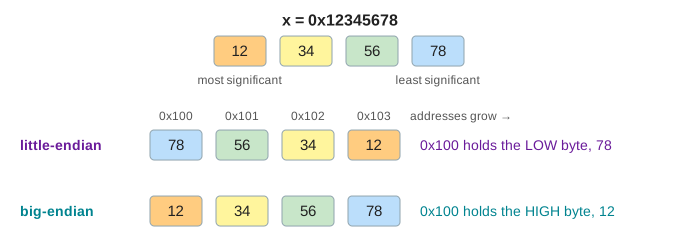
Memory is a row of bytes, each with its own address. A 32-bit integer such as 0x12345678 needs four of
them, so the CPU must pick an order. Big-endian puts the most significant byte, 12, at the
lowest address, the way we write the number. Little-endian puts the least significant byte,
78, there. The page runs the same operations on both, in lockstep: each Step moves one byte in each lane, and
a byte keeps its colour (orange for the most significant, blue for the least) wherever it goes.
Little-endian: the low byte first
x86 and x86-64 are little-endian, and so are ARM and RISC-V as they are almost always run (ARM can switch, but Linux, Android, iOS and Windows on ARM all use little-endian). So the computer you are reading this on is almost certainly little-endian. One nice property: the value starts at the same address at every width. The byte at the int's address is its low byte, so reading the int 42 as one byte still gives 42 (Demo: read 1 byte of the int 42 at its address). Adding long numbers byte by byte also starts at the lowest address and carries upward.
Big-endian: the high byte first
Big-endian is network byte order: the IP, TCP and UDP headers, DNS and most binary protocols send the
most significant byte first. Java's DataOutputStream and ByteBuffer default to it, as do PNG
and JPEG headers, and IBM's s390x and older SPARC and PowerPC machines. Its nice property is that a hex dump reads like
the number: 12 34 56 78 (Demo: store 0x12345678).
On one machine, the order never shows
A CPU reads memory in the same order it writes it. Store an int, load it back, and both lanes get
0x12345678 (Demo: store, then load it back). Endianness only matters when the bytes are looked
at in a different way than they were written: sent to another machine, written to a file, or read through a pointer
of another width.
Sending ints: htonl and ntohl
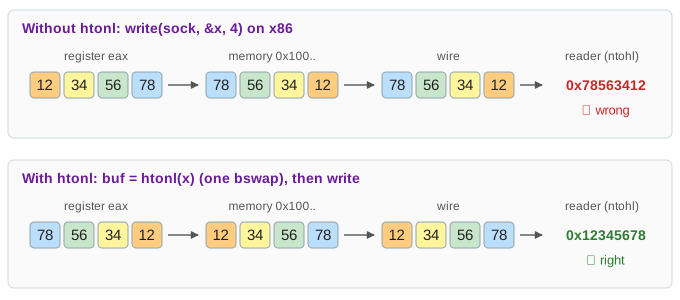
write(sock, &x, 4) sends the 4 bytes in address order. From an x86 machine that is
78 56 34 12, and a reader that follows the protocol (big-endian) decodes 0x78563412
(Demo: send without htonl). The fix is htonl ("host to network, long") before sending and
ntohl after receiving. On a little-endian CPU it is one bswap instruction; on a big-endian CPU
it does nothing, so the same source code is right on both (Demo: send with htonl). The 16-bit versions
htons/ntohs are used for port numbers.
What each order makes easy
| Little-endian | Big-endian | |
|---|---|---|
| Where | x86, x86-64, ARM, RISC-V (almost every CPU today) | Network protocols, Java streams, many file formats, s390x |
| Byte at the lowest address | least significant | most significant |
Hex dump of 0x12345678 | 78 56 34 12 (reads reversed) | 12 34 56 78 (reads like the number) |
| Read a smaller width at the same address | same value if it fits ✓ | gets the top part ✗ |
| Sending to the network | needs htonl (1 swap) | already in order (0 swaps) |
Compare as bytes (memcmp) gives numeric order | no | yes, for unsigned values |
Neither order is faster on its own; a CPU wires its loads to one of them. What costs time is converting, and that is one cheap instruction. Big-endian keys sort correctly as byte strings, which is why databases and key-value stores (for example, LSM-tree keys) often encode integers big-endian even on x86.
Common mistakes
- "Endianness reverses the bits." It orders bytes. The bits inside a byte are the same on both:
0x78is0111 1000everywhere. - Swapping strings. A UTF-8 or ASCII string is a list of single bytes, so it has no byte order. Only multi-byte numbers do (and UTF-16 text, which is why it has a byte-order mark).
- Swapping twice. Calling
htonlon a value that is already in network order breaks it again. Convert once, at the edge where the bytes enter or leave. - Casting a byte buffer to
int *. It works on the machine you test on and breaks on the other order (and may be misaligned). Decode the bytes with shifts, or withntohl/be32toh.
See also Number Bases for hex and bytes, Floating Point
for another multi-byte number (a double has a byte order too), and TCP Sockets for the bytes on the wire.
What the page leaves out
Only 32-bit ints are shown; 16-bit and 64-bit values work the same way with 2 and 8 bytes. It leaves out
mixed orders such as the PDP-11's "middle-endian" 34 12 78 56 and the word-swapped doubles of old ARM,
bi-endian CPUs that can switch at run time, bit order on serial links (which is a separate question), alignment, and
the endian-independent formats that sidestep the issue: text formats like JSON, and varints in Protocol Buffers.