The idea: the server fetches the URL for you
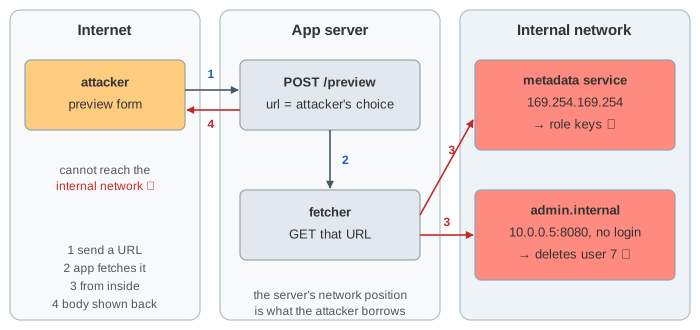
Many apps fetch a URL that a user typed: a link preview, a webhook, "import an image from a URL", a PDF renderer. The request then comes from the server, not from the user's browser. The server sits inside a private network, where it can reach things the internet cannot: the cloud's instance metadata service at 169.254.169.254, admin panels with no login, databases, localhost ports. If the app fetches whatever it is given, an attacker can point it at those. This is server-side request forgery (SSRF): the attacker writes the request, the server sends it with its own network position and trust.
The canvas has three regions: the internet (the attacker's browser on the app's preview form, a public site, the attacker's own web and DNS servers), the app server (the request, the guard that checks the URL, the VPC DNS resolver and the fetcher), and the internal network (the metadata service and an internal admin service). Pick a URL and press Fetch; the two selects change the app's guard and the metadata service version. The table at the bottom keeps every fetch.
What the attacker reaches
On AWS, GET http://169.254.169.254/latest/meta-data/iam/security-credentials/<role> returns temporary keys for the instance's IAM role. With IMDSv1 any plain GET from the machine gets them, so one preview of that URL hands the attacker the server's cloud identity (Demo 1). Google Cloud and Azure have the same kind of endpoint (metadata.google.internal, also at 169.254.169.254, needing a Metadata-Flavor or Metadata header). The second target in Demo 1 is an internal admin service that trusts every caller inside the network: a GET to admin.internal:8080/delete-user?id=7 deletes a user. Other common targets are localhost ports (Redis, Elasticsearch, a debug endpoint), Kubernetes and Docker APIs, and anything reached through file:// or gopher:// if the client supports those schemes.
Even when the response is not shown (blind SSRF), the attacker still learns from timing and error messages which hosts and ports exist, and a GET that changes state still does its damage.
Why a blocklist fails
The first fix most people write compares the host with a list of bad names. But an IP address has many spellings, and the HTTP client accepts them all. 2852039166 is 169.254.169.254 written as one 32-bit number (0xA9FEA9FE), so it is not on the list and still reaches the metadata service (Demo 2). Internal names like admin.internal are not on the list either.
| spelling | where it goes |
|---|---|
2852039166 | 169.254.169.254 (decimal) |
0xa9fea9fe, 0251.0376.0251.0376 | 169.254.169.254 (hex, octal) |
127.1, 0, [::1] | localhost |
[::ffff:169.254.169.254] | metadata, as an IPv4-mapped IPv6 address |
anything.nip.io-style names | a public name whose DNS answer is a private IP |
a public URL that answers 302 | wherever the redirect points |
The lesson: check what the request will actually connect to, the IP address, not the text of the URL.
Check the IP, but only once: DNS rebinding
A better guard resolves the host and refuses private (10.0.0.0/8, 172.16.0.0/12, 192.168.0.0/16), loopback (127.0.0.0/8, ::1) and link-local (169.254.0.0/16, fe80::/10) addresses. It catches the decimal spelling, because it parses the host the same way the client does. But if it then hands the URL to the HTTP client, the client looks the name up again. The attacker owns the DNS server for rebind.attacker.example and answers with TTL 0, so nothing is cached: the first answer is a public address (the guard is happy), the second is 169.254.169.254 (the client connects there). This is DNS rebinding, a time-of-check to time-of-use bug (Demo 3).
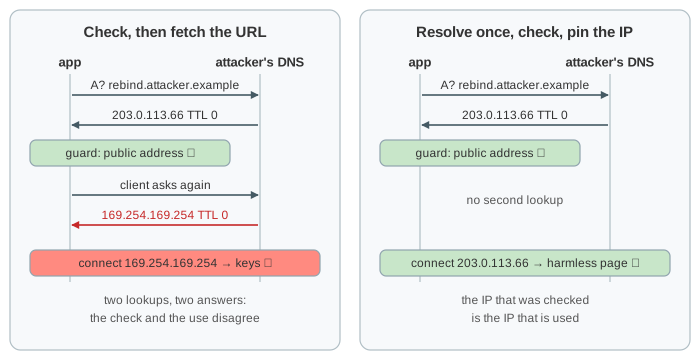
The fix is to resolve once, check every returned address, and make the client connect to that IP (keeping the name only for the Host header and TLS). Rebinding then gets nothing but the attacker's own server, and the internal names and the normal link behave as expected (Demo 4). In code this means a custom resolver or socket hook in the HTTP client, or an egress proxy that does the check at connect time. The same check must run again on every redirect, or the client must not follow redirects.
Defences in layers
If the feature only needs a few destinations, an allowlist of hosts (and schemes and ports) is the simplest and strongest guard: everything else is refused before any DNS lookup (Demo 5). When users must be able to fetch arbitrary public URLs, use the resolve-check-pin approach, and add layers that do not depend on the app code being right:
| layer | what it does | stops |
|---|---|---|
allowlist of hosts, https only | refuse every other destination | all of the above, when the feature allows it |
| resolve once, check, pin the IP | connect only to the checked public address | spellings, internal names, DNS rebinding |
| no redirects, or re-check each hop | a 302 cannot move the request inside | redirect tricks |
| egress firewall / proxy | the fetcher's network can only reach the internet | bugs in the app's own check |
| IMDSv2, hop limit 1 | metadata needs a PUT token and a header | GET-only SSRF reaching the keys |
| authentication on internal services | "inside the network" is not a credential | the admin call, even if reached |
| do not return raw responses | show a title and an image, not the body | reading data (blind SSRF still possible) |
IMDSv2 deserves its own line. A caller must first send PUT /latest/api/token with an X-aws-ec2-metadata-token-ttl-seconds header, then pass the returned token in X-aws-ec2-metadata-token on every GET. A typical SSRF can only make a GET with no custom headers, so it gets 401 (Demo 6). The PUT response also has an IP hop limit of 1 by default, so a container behind an extra network hop cannot get a token. AWS recommends requiring IMDSv2 on every instance; it is a setting, so leaving IMDSv1 on is a misconfiguration.
Where it sits in OWASP
SSRF was its own entry, A10, in the OWASP Top 10 2021; in the 2025 list it is part of A01 Broken Access Control. It usually starts as a design flaw, a feature that trusts user input to choose a network destination (see OWASP A06:2025 Insecure Design), and it becomes a breach through configuration: IMDSv1 left on, flat internal networks, admin services without login (see OWASP A02:2025 Security Misconfiguration). The browser-side cousin is CSRF: there the attacker borrows the victim's cookies, here the server's network position. CORS does not apply at all, because no browser is involved in the server's request (see CORS and the Preflight Request).
What the page leaves out
Redirect chains, non-HTTP schemes (file://, gopher://, dict://) and smuggling other protocols through them, URL parser differences between the guard and the client (http://good.example@169.254.169.254/), IPv6 and dual-stack lookups that return several addresses, blind SSRF and its out-of-band detection, SSRF in PDF and image renderers, cloud-specific metadata headers, and network-level controls such as VPC endpoints and service meshes.