The idea: the browser guards the response, not the server
A web page can send requests to any server. What the browser stops is the page's JavaScript reading the answer from a different origin. That rule is the same-origin policy. CORS (Cross-Origin Resource Sharing) is how a server opts out of it: by sending Access-Control-Allow-* headers, it tells the browser which other origins may read its responses. The server never blocks anything itself. The checks all happen in the browser.
On the canvas, the browser tab is on the left: the fetch() call, the origin comparison, the CORS checks, the preflight cache and the console. The servers are on the right: the page's own server and an API with a CORS config, the last request it received, its access log and its data. Pick a request and press Send, change the server CORS config, or run a demo.
What an origin is
An origin is scheme + host + port. Two URLs have the same origin only if all three match. The path does not matter.
| page | request | same origin? |
|---|---|---|
https://shop.example | https://shop.example/api/cart | yes |
https://shop.example | https://api.example/products | no: host differs |
https://shop.example | http://shop.example/ | no: scheme differs |
https://shop.example | https://shop.example:8443/ | no: port differs (443 vs 8443) |
A same-origin request involves no CORS at all (Demo 1).
Simple requests and the preflight
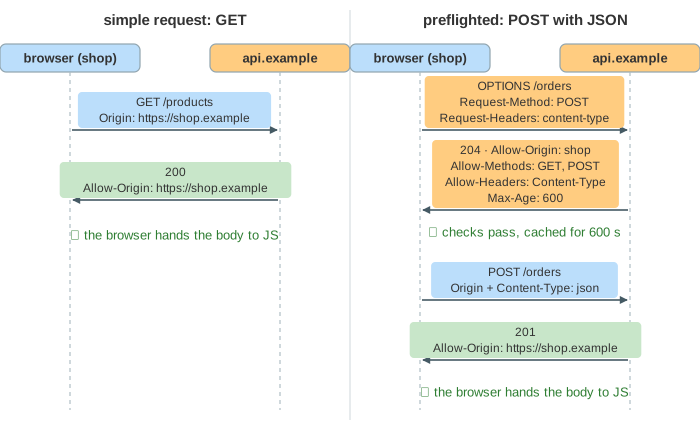
A cross-origin request that an HTML form could already send is a simple request. The browser sends it at once, adds an Origin header, and checks the response afterwards (Demo 2: simple cross-origin GET). It is simple when:
- the method is
GET,HEADorPOST, - it sets only CORS-safelisted headers (
Accept,Accept-Language,Content-Language,Content-Type), and Content-Typeisapplication/x-www-form-urlencoded,multipart/form-dataortext/plain.
Anything else, such as a DELETE, an Authorization header, or a JSON body, could do things old servers never expected from another site. So the browser first sends a preflight: an OPTIONS request to the same URL, with no body and no cookies:
OPTIONS /orders
Origin: https://shop.example
Access-Control-Request-Method: POST
Access-Control-Request-Headers: content-type
Only if the answer allows it does the real request go out (Demo 3: POST with JSON needs a preflight). If the preflight fails, the real request is never sent. In Demo 6 the API does not list DELETE, so the server only ever sees the OPTIONS and order 7 survives.
The response headers
| header | sent on | meaning |
|---|---|---|
Access-Control-Allow-Origin | preflight and response | the one origin allowed to read (echoed from Origin), or * |
Access-Control-Allow-Methods | preflight | methods the real request may use |
Access-Control-Allow-Headers | preflight | non-safelisted headers it may set |
Access-Control-Allow-Credentials | preflight and response | true: requests with cookies may be read |
Access-Control-Max-Age | preflight | seconds the browser may cache this preflight |
Access-Control-Expose-Headers | response | extra response headers JavaScript may read |
For a simple request the server has already run it before the browser checks anything. When the check fails, the JavaScript gets TypeError: Failed to fetch instead of the body, but the work is done. In Demo 5: server sends no CORS headers the GET is answered and logged on the server, yet the page cannot read it. The POST with JSON never leaves the browser, because its preflight fails.
Cookies and credentials
By default a cross-origin fetch sends no cookies. With credentials: "include" it does, and then the rules are stricter: Access-Control-Allow-Origin must name the exact origin (not *), and the server must also send Access-Control-Allow-Credentials: true. Otherwise anyone's page could read a logged-in user's data from any API that answers *. In Demo 7 the wildcard config is rejected, and the echo config works.
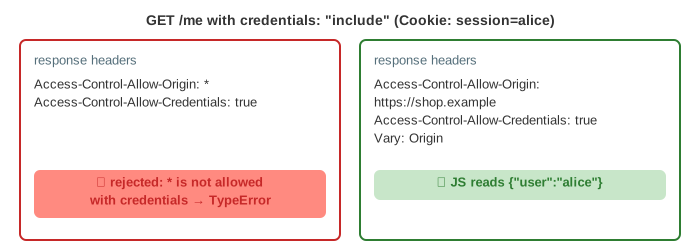
If the server echoes the Origin header back, it should also send Vary: Origin, so a shared cache does not serve one origin's answer to another.
The preflight cache
A preflight costs a full round trip. The browser caches a passed preflight for Access-Control-Max-Age seconds, keyed by origin, URL and credentials mode. Browsers cap that time (Chrome at 2 hours, Firefox at 24 hours), and without the header Chrome keeps it for only 5 seconds. In Demo 4 the second POST skips the OPTIONS. After 10 minutes the 600-second entry has run out, so the third POST is preflighted again.
CORS is not CSRF protection
CORS hides responses. It does not stop requests. A page on https://evil.example can send a simple POST to the API with the user's cookie: a plain HTML form does the same with no CORS involved at all. The server runs it. The attacker never reads the answer, but does not need to (Demo 8: alice's balance drops from 1 000 to 900).
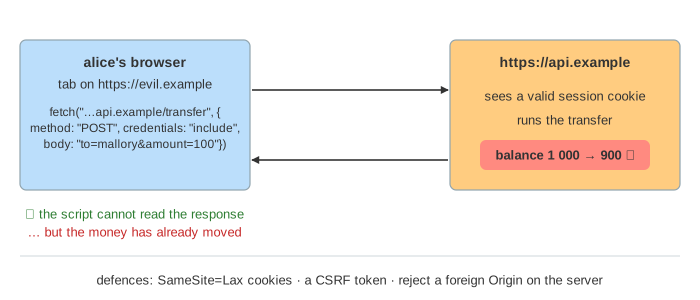
Defences against that live on the server and in the cookie: SameSite=Lax or Strict cookies (not sent on cross-site POSTs), CSRF tokens in forms, and rejecting state-changing requests whose Origin is not your own. See Cookies for SameSite and OAuth for tokens sent in an Authorization header, which always need a preflight.
CORS does not protect against SSRF: the server's own outgoing requests involve no browser.
What the page leaves out
Access-Control-Expose-Headers in action, mode: "no-cors" (opaque responses), redirects during CORS, private network access preflights, CORS for fonts, images with crossorigin and canvas tainting, Timing-Allow-Origin, and the exact cache keys browsers use. The servers here are scripted, and the clock jumps 5 seconds per request.