The idea: the name is read by a second parser
Both bugs start the same way. A handler takes a name from the request and pastes it into a string. Then a second parser reads that string: the path resolver, which gives .. and a leading / a meaning, or the shell, which gives ;, |, && and $( ) a meaning. The handler thought it had a file name. The second parser sees directions to another folder, or a second command.
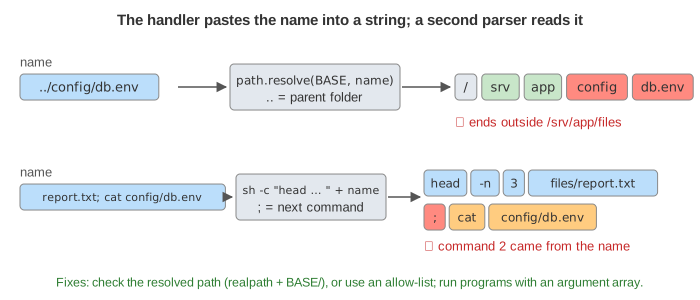
.. into "go up", the shell turns ; into "next command".The canvas is a toy server in /srv/app. Its handlers should only read files in BASE = /srv/app/files (the green band in the file tree). Next to it are files_old/ and config/db.env, which holds toy secrets. Pick a handler and a name and press Send Request, or run a demo. The first handler of each kind is the unsafe one; the rest are the fixes.
Path traversal: how the path moves
path.resolve(BASE, name) (or Python's os.path.join) reads the name one segment at a time, starting at BASE. The canvas draws that as a row of segment boxes:
..removes the last segment:files/../config/db.envis/srv/app/config/db.env(Demo 1).- A name that starts with
/is absolute: the resolver throws BASE away and starts again at the root. Python'sos.path.join("/srv/app/files", "/etc/x")is/etc/xtoo. - A symlink inside BASE can point anywhere. The path string looks fine, but the OS follows the link when it opens the file (Demo 3).
report.txt; cat configis not.., so to the resolver it is only an odd file name. The path resolver does not care about;.
URL-encoding does not help: ..%2Fconfig%2Fdb.env is decoded by the server before the handler sees it. Neither does removing ../ from the input: filters like that are easy to get wrong. Check the final path instead.
Fix 1: resolve, realpath, then check BASE + "/"
The check has to run on the path the OS will really open. So: resolve the name against BASE, resolve symlinks with realpath, and only then check the prefix, with the separator on the end.
| check | what gets through |
|---|---|
name.includes("..") before resolving | an absolute path, a symlink; easy to bypass in other ways |
resolve(...).startsWith(BASE) | ../files_old/notes.txt: /srv/app/files_old starts with /srv/app/files (Demo 2), and symlinks (Demo 3) |
resolve(...).startsWith(BASE + "/") | symlinks: the string is inside, the file is not |
realpath(resolve(...)).startsWith(BASE + "/") | nothing on the page (Demo 3, Demo 4) |
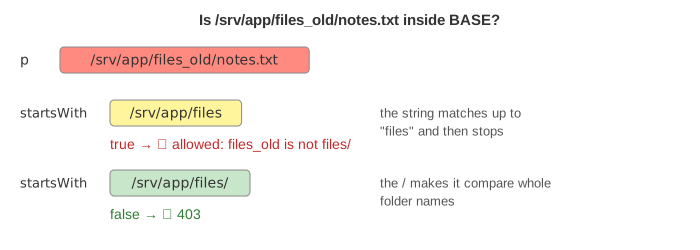
/, files_old counts as inside files.In Python the same check is p = os.path.realpath(os.path.join(BASE, name)) then os.path.commonpath([BASE, p]) == BASE, or Path(p).is_relative_to(BASE) on a resolved Path. Make BASE itself a real path, or the comparison fails for the wrong reason. There is a small gap between the check and the open if someone can change the files in between; where that matters, open relative to a directory handle (openat2 with RESOLVE_BENEATH on Linux).
Fix 2: an allow-list of names
If the files are known, do not build a path from user text at all. Keep a set of allowed names, or better, map an id to a path the server chose: /file?id=7 → files/report.txt. A name that is not in the set stops at the first line, with no path built and nothing to escape (Demo 5). This is the safest fix; the realpath check is for when the set of files is open, like user uploads.
Command injection: what the shell does with the string
exec("head -n 3 files/" + name) (Node), os.system(...) or subprocess.run(cmd, shell=True) (Python) and Runtime.exec(String) on some platforms all hand one string to /bin/sh -c. The shell splits it into words at spaces, and into commands at ;, &&, || and |. It also expands $( ), backticks, $VAR and *. With the name report.txt; cat config/db.env the shell runs two commands, and the second one runs with the server's rights (Demo 6).
Fix 3: an argument array, no shell
Run the program directly and pass the arguments as an array: execFile("head", ["-n", "3", "--", "files/" + name]) in Node, subprocess.run(["head", "-n", "3", "--", "files/" + name]) in Python (no shell=True), new ProcessBuilder("head", "-n", "3", "--", path) in Java. The array goes to execve() as it is. Nothing splits it, so the whole name is one argument and ; is just a character in a file name (Demo 7).
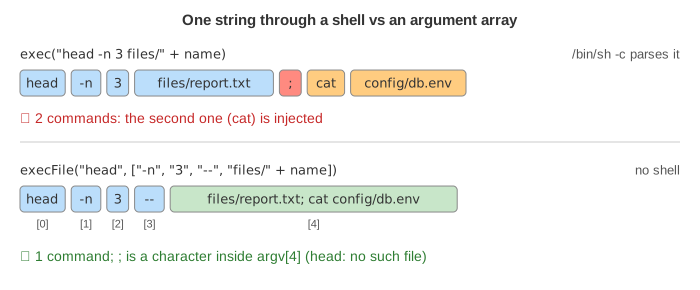
Put -- before user-supplied arguments. It tells most programs that options end there, so a name like -n100 or --help is a file name, not an option. If a shell is truly needed (a pipeline), keep the user value out of the string: pass it as an argument (sh -c 'head -n 3 -- "$1"' sh "$name") or quote it with shlex.quote. An argument array is still the better default.
Fix 4: the argument still needs checking
An argument array stops command injection, not path traversal. files/../config/db.env is still a path, and head opens it (Demo 7, second request). So validate the argument as well: an allow-list or a strict pattern such as ^[\w-]+\.txt$ (no /, no dots except the one before txt), or the realpath check from Fix 1 (Demo 8). Better still, use a library call instead of a program when one exists: reading three lines needs no head.
All handlers against all names
| handler | report.txt | ../config/db.env | /srv/app/config/db.env | ../files_old/notes.txt | pics/latest.png | report.txt; cat config/db.env |
|---|---|---|---|---|---|---|
| resolve only | 200 | 200 ✗ | 200 ✗ | 200 ✗ | 200 ✗ | 404 |
| startsWith(BASE) | 200 | 403 | 403 | 200 ✗ | 200 ✗ | 404 |
| realpath + BASE/ | 200 | 403 | 403 | 403 | 403 | 404 |
| allow-list | 200 | 404 | 404 | 404 | 404 | 404 |
| exec string | 200 | 200 ✗ | 500 | 200 ✗ | 200 ✗ | 200 ✗ injected |
| execFile argv | 200 | 200 ✗ | 500 | 200 ✗ | 200 ✗ | 500 |
| allow-list + execFile | 200 | 400 | 400 | 400 | 400 | 400 |
✗ = the response holds a file from outside BASE. Both bugs are in the OWASP Top 10: path traversal under Broken Access Control (see OWASP A01 Broken Access Control) and command injection under Injection, next to SQL injection and XSS. A server that fetches a URL from the user has the same shape of bug: see Server-Side Request Forgery.
Defence in depth helps when a check is missed: run the server as a user that cannot read config/, keep secrets out of the web root, and run it in a container or chroot with only BASE mounted.
What the page leaves out
Windows paths (\, drive letters, C:.., device names like CON), Unicode and double-encoding tricks, zip archives that write ../ paths when extracted ("zip slip"), file uploads that choose their own name, argument injection into programs with dangerous options, other shells and cmd.exe quoting rules, and race conditions between the check and the open.