The idea: same token, two places to keep it
After login the browser holds a token that proves who it is, and sends it with every request. A web app can keep that token in a cookie marked HttpOnly, which the browser sends by itself and JavaScript cannot read, or in localStorage, where the app's JavaScript reads it and adds it as a header. The token and the server are the same; the two places fail against different attacks.
The canvas runs the same bank app twice, side by side. Both servers keep a session table (token → alice, 30 minutes) and alice's balance of $1000. Each lane has a browser tab on bank.example with its cookie jar and localStorage, an attacker at evil.example, and the server. Every action happens in both lanes at once; the scoreboard counts stolen copies, attacker requests the server accepted, attacks blocked, and the balance. Pick an action and press Do It, or run a demo.
The HttpOnly cookie
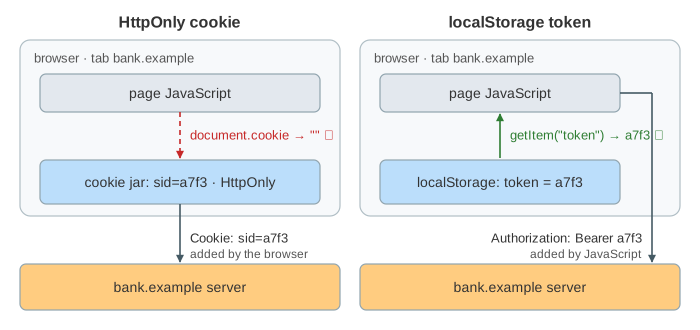
The login reply says Set-Cookie: sid=a7f3; HttpOnly; Secure; SameSite=Lax; Max-Age=1800. HttpOnly keeps it out of document.cookie, Secure keeps it off plain HTTP, SameSite decides whether it goes with requests started by other sites, and Max-Age makes the browser delete it after 30 minutes. From then on the browser attaches Cookie: sid=a7f3 to every request to bank.example, with no code in the app (Demo 1: log in, a request, and expiry).
The localStorage token
The login reply carries {"token": "a7f3"} in its body, and the app runs localStorage.setItem("token", "a7f3"). Before each request it reads the token back and adds Authorization: Bearer a7f3. The browser never sends it on its own, and it never expires: it stays on disk, across restarts, until JavaScript deletes it. In Demo 1 after 30 minutes the cookie is simply gone, while the app still sends the dead token, gets a 401, and has to remove it itself.
XSS: reading the token vs using it
In cross-site scripting (XSS) the attacker gets a script to run inside bank.example's page, for example through a comment that is not escaped. That script has the page's rights. What it can do with the token depends on where the token lives.
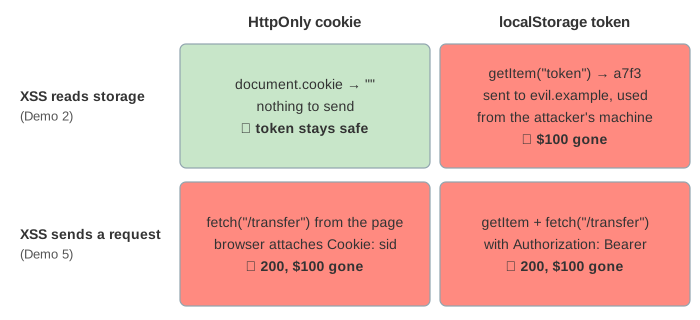
- Reading (Demo 2: XSS steals the token):
document.cookiereturns an empty string, so nothing leaves the cookie lane.localStorage.getItem("token")returns the token, the script sends it toevil.example, and the attacker uses it from their own machine for as long as the session lives: $100 gone. - Riding (Demo 5: XSS rides the open page): the script does not read anything; it calls
fetch("/transfer", {method: "POST"}). That is a same-origin request, so the browser attaches the cookie. Both lanes lose $100. The attack only works while alice has the page open, but HttpOnly does not stop it.
So HttpOnly turns a stolen login into a limited one, not into a safe one. The real fix is to stop the XSS: output encoding and a Content-Security-Policy, shown in XSS and Content-Security-Policy.
CSRF and SameSite
In cross-site request forgery (CSRF) alice opens evil.example, whose hidden form posts to bank.example/transfer. The request comes from alice's own browser, so the browser decides which of her cookies go with it. A Bearer token is never sent this way: a form cannot add headers, and evil.example cannot read bank.example's localStorage.
| cookie attribute | cross-site form POST | cookie lane | localStorage lane |
|---|---|---|---|
SameSite=None | cookie sent | 200, $100 gone ✗ (Demo 3) | 401 ✓ |
SameSite=Lax (browser default) | cookie not sent | 401 ✓ (Demo 4) | 401 ✓ |
SameSite=Strict | cookie not sent | 401 ✓ | 401 ✓ |
Lax still sends the cookie on a top-level GET navigation, so a GET must never change anything. Sites that need None (an embedded widget, a third-party login) add a CSRF token or check the Origin header; see CSRF and SameSite Cookies.
Logout and expiry
Both servers keep the session, so logout deletes it and every copy of the token dies at once, including one an attacker stole (Demo 6: log out kills the stolen token: the first transfer goes through, the one after logout gets 401). The cookie lane also tells the browser to drop the cookie with Max-Age=0; the localStorage lane must call removeItem itself. With a self-contained token such as a JWT the server has no session to delete, and a stolen copy lives until its exp: see JWT vs Session Cookies.
Which one to use
| HttpOnly cookie | localStorage token | |
|---|---|---|
| XSS reads and exfiltrates it | no ✓ | yes ✗ |
| XSS uses it from the open page | yes ✗ | yes ✗ |
| CSRF from another site | only with SameSite=None | no ✓ |
| sent by | the browser, automatically | the app's JavaScript |
| expiry | Max-Age, the browser deletes it | none, the app must delete it |
| other domains / native apps | harder (one site, CORS with credentials) | easy: any API, any client |
For a browser app talking to its own backend, the usual advice (OWASP) is an HttpOnly; Secure; SameSite=Lax cookie. A common middle way for single-page apps keeps a short-lived access token only in JavaScript memory, never in storage, and a refresh token in an HttpOnly cookie on the refresh endpoint. Cookie attributes in detail are on How Browser Cookies Work.
What the page leaves out
sessionStorage (per tab, gone when the tab closes), IndexedDB, keeping tokens in memory, the __Host- cookie prefix, Domain and Path scoping, CSRF tokens, CORS, token binding (DPoP), malware on the device (which reads both places), session fixation, and refresh tokens.