The idea: a terminal is a device with a line discipline in the middle
When you log in with ssh, no real terminal is attached to the server. The kernel gives
sshd a pseudo-terminal (pty): a pair of devices joined back to back.
sshd holds the master side (it opened /dev/ptmx; on the canvas it is fd 9).
Your shell gets the slave side, /dev/pts/0, as its stdin, stdout and stderr.
Between the two sits the line discipline, N_TTY. It is the part of the
kernel that buffers a line, echoes your keys, and turns ^C into a signal.
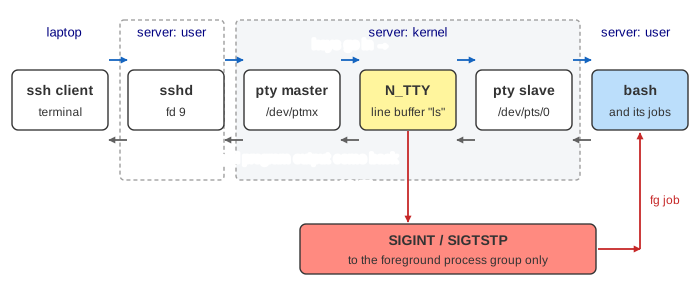
The canvas draws one such session. On the left is your laptop: a terminal window and the ssh client.
On the right is the server. In user space you see sshd and the session 2001 with its
process groups; in the kernel you see the pty master, N_TTY and the pty slave. Each box that flies is
one hop of real data: a key, an echo, a line handed to read(), or a signal.
Canonical mode: the line buffer and the echo
By default a terminal is in canonical mode (the ICANON flag of
termios). N_TTY keeps the keys of the current line in its own line buffer.
The program that reads the terminal is not woken for each key: it sleeps in read(0) until
the line is complete. That is why Backspace (VERASE) and Ctrl-U (VKILL)
work in every program without the program doing anything: the line is still in the kernel.
Your laptop does not draw the keys you type. With ECHO on, N_TTY writes each key back
out of the master; sshd sends it back to you; only then does it appear on the screen. Over a slow
link you can see this delay. Enter sends \r (0x0d), which ICRNL turns into
\n; the \n finishes the line, and read() returns all of it,
for example the 3 bytes "ls\n" (Demo: type ls⏎). On the way out,
ONLCR turns each \n a program writes into \r\n.
stty -a prints all of this for your terminal: the flags (icanon echo isig icrnl
onlcr) and the special characters (intr = ^C; susp = ^Z; eof = ^D; erase = ^?).
^C, ^Z, ^D: keys that never reach the program
With ISIG on, N_TTY checks every incoming byte against the special characters. A match
is not put in the buffer. Instead N_TTY flushes the input, echoes the key as ^C or
^Z (ECHOCTL), and sends a signal to the terminal's foreground process
group, all of its processes at once (kill_pgrp).
| Key | Byte | termios name | What N_TTY does | Default action |
|---|---|---|---|---|
| Ctrl-C | 0x03 | VINTR | SIGINT to the foreground group | terminate (status 130) |
| Ctrl-\ | 0x1c | VQUIT | SIGQUIT to the foreground group | terminate + core dump |
| Ctrl-Z | 0x1a | VSUSP | SIGTSTP to the foreground group | stop |
| Ctrl-D | 0x04 | VEOF | hands over the line without a \n; on an empty line read() returns 0 | (no signal: end of file) |
So Ctrl-C is not "kill the program". It is "send SIGINT to whoever is in the foreground group".
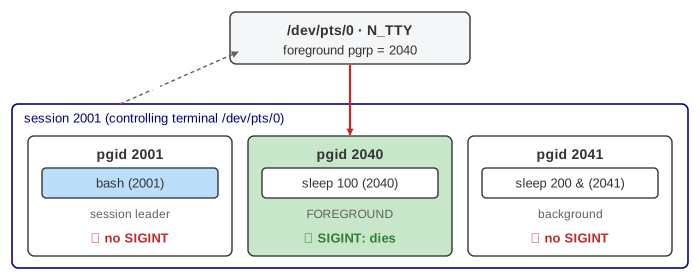
In Demo: sleep 100, then Ctrl-C, the signal goes to group 2040 only. bash is in group 2001
and gets nothing; it only learns from waitpid() that its child died with status
128 + 2 = 130. A program may catch SIGINT: bash itself does, and just starts a new line. How the
signal is then delivered inside the process is on How Linux Delivers a Signal.
Ctrl-D is not a signal at all. It ends the read() early; with nothing typed, the
read returns 0, which every program treats as end of file. cat then exits; bash logs you out
(Demo: a background job reads the terminal ends with it).
Sessions, process groups and the foreground group
Job control is built from three kernel ideas. A session is everything started from
one login: sshd's child called setsid() and then became bash, so pid 2001 is also the session id, and
/dev/pts/0 is the session's controlling terminal. A process
group is one job: bash puts each command line in its own group with setpgid()
(a pipeline a | b is two processes in one group). And the terminal remembers one
foreground group, which bash sets with tcsetpgrp().
| You type | What bash does |
|---|---|
sleep 100 | fork(); child setpgid(2040, 2040), execve; bash tcsetpgrp(0, 2040) and waitpid(2040, WUNTRACED) |
sleep 100 & | the same, but no tcsetpgrp and no wait: prints [1] 2040 |
| Ctrl-Z | waitpid returns "stopped"; tcsetpgrp(0, 2001); prints [1]+ Stopped |
bg | kill(-2040, SIGCONT): the job runs on, in the background |
fg | tcsetpgrp(0, 2040), kill(-2040, SIGCONT) if stopped, waitpid |
The negative pid in kill(-2040, …) means "the whole group". A stopped job keeps its
memory and open files; it simply is not scheduled until SIGCONT
(Demo: Ctrl-Z stops the job, bg resumes it). Forking itself is on
A Linux Process from fork() to Reaping.
Background jobs and SIGTTIN
If two programs read the same terminal, your keys would go to one or the other at random. So the
kernel lets only the foreground group read. When a process in a background group calls
read() on its controlling terminal, N_TTY's job_control() check sends
SIGTTIN to its group, and the default action stops it. bash reports
[1]+ Stopped cat; fg gives it the terminal and continues it, and now its
read just waits for a line (Demo: a background job reads the terminal: SIGTTIN).
Writing is allowed by default: a background job's output just mixes with yours. With
stty tostop, a background write gets SIGTTOU and stops too.
Changing the terminal settings (tcsetattr) from the background always gets SIGTTOU.
Hangup: SIGHUP, nohup and friends
"HUP" is from the days of modems: hang up the phone line. Today it happens when the ssh connection
ends. sshd reads end of file on the socket and closes the pty master. The kernel then
hangs up the slave: reads return 0, writes fail with EIO, and the
session leader gets SIGHUP (with SIGCONT). An interactive
bash then resends SIGHUP to every job, and SIGCONT to stopped ones, so that they wake up to see it,
and exits. A job whose SIGHUP action is the default dies (status 129).
nohup cmd & sets SIGHUP to SIG_IGN before it execs the
command, and sends its output to nohup.out instead of the terminal that is about to
go away. That job survives the disconnect and is re-parented to PID 1 (Demo: ssh disconnect).
Other ways to the same end:
disownremoves a job from bash's table, so bash does not resend SIGHUP to it.setsid cmdstarts it in a new session with no controlling terminal at all.tmuxandscreenkeep their own pty master in a server process that never hangs up; you just detach and reattach.systemd-run --useror a service unit, for things that should not live in a login at all.
Logging out with Ctrl-D is different: bash exits without sending SIGHUP (huponexit is off),
so running background jobs go on. Stopped jobs are the exception: their group is now
orphaned, and the kernel sends it SIGHUP and SIGCONT, because nobody is left who could ever
continue it.
Raw mode: when a program wants every key
A full-screen program such as vim, less or top turns canonical
mode and echo off (cfmakeraw, or stty raw -echo), so read()
returns each key at once and the program draws the screen itself. The ssh client does this to
your laptop's terminal: every key, Ctrl-C included, then goes to the server as a plain byte,
and the server's N_TTY decides what it means. A program that crashes in raw mode leaves the terminal
without echo; reset or stty sane fixes it.
What the page leaves out
- bash's readline: at the prompt it actually switches the tty to non-canonical mode and does
its own echo and editing. The page draws the canonical mode that
cat(andbash --noediting) see. - The SSH protocol itself: channels, the
pty-reqrequest with the terminal size and modes, window changes (SIGWINCH), encryption and keys. - Pipelines with several processes in one group,
Ctrl-\,VERASE/VKILL/VWERASEediting, flow control with Ctrl-S / Ctrl-Q. SIGTTOUwithtostop, the kernel's SIGHUP to the old foreground group when the session leader exits, andEIOfor reads from orphaned groups.- Virtual consoles (
/dev/tty1), serial lines,/dev/tty, and other line disciplines (N_PPP,N_GSM). - Process scheduling and signal delivery inside each process (see the context switch page and the signals page).