The idea: three versions of every file
You are on main and run git merge feature. Both branches changed things since they split.
To combine them, Git does not just compare the two tips. It also looks at the version both started from, the
merge base. So every file has three versions: the base, ours (HEAD,
the tip of the branch you are on) and theirs (the tip of the branch you merge in). This is a
three-way merge.
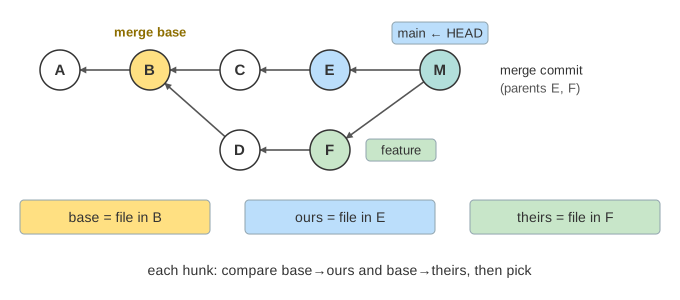
On the canvas, commits have letters instead of hashes, and one file, app.cfg, has a few
key = value lines. Each line is one hunk: a piece of the file that is decided on its own.
Finding the merge base
Commits point to their parents. Git walks back from both tips and marks what each one can reach. The commits
reachable from both are the common ancestors; here that is B and A. A is B's parent, so it is older
news: the best common ancestor is one that is not an ancestor of another common one. That is the merge
base, and you can ask for it with git merge-base main feature. (Demo: clean merge)
The rules, one hunk at a time
Git compares base with ours and base with theirs, and decides each hunk alone:
| base vs ours | base vs theirs | result |
|---|---|---|
| same | same | keep the base |
| changed | same | take ours |
| same | changed | take theirs |
| changed to X | changed to X | take X once |
| changed to X | changed to Y | conflict |
So a change made on one side only always wins, and the merge needs no help as long as the two sides touched different lines (Demo: clean merge). If both sides made exactly the same edit, it is taken once, not twice (Demo: both sides make the same change).
Why two versions are not enough
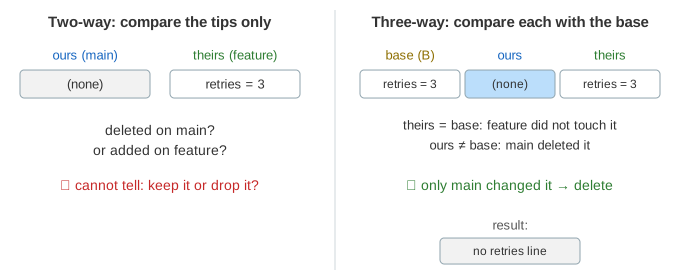
Say main has no line retries = 3 and feature has it. Comparing only the two tips,
you cannot tell if main deleted it or feature added it, so you cannot know whether to keep it.
The base answers that: it had the line, so main deleted it and the deletion wins. In the same demo
feature adds cache = on, which the base does not have, so the addition wins.
(Demo: one side deletes, the other adds)
Conflicts and conflict markers
When both sides changed the same hunk in different ways, Git cannot choose. It merges every other hunk, writes both
versions into the file between conflict markers, prints CONFLICT (content) and stops
without a commit:
port = 8080
host = localhost
<<<<<<< HEAD
timeout = 60
=======
timeout = 10
>>>>>>> feature
retries = 5
log = info
You edit the file to what it should be, then git add app.cfg and git commit; that makes the
merge commit. git merge --abort gives up instead. With git config merge.conflictStyle diff3
(or zdiff3) Git also shows the base lines between ||||||| and =======, which often
makes it clear what each side meant. (Demo: conflict on timeout, then keep theirs)
Fast-forward: when there is nothing to merge
If the merge base is HEAD itself, main has no commits of its own since the split. Every change is on
feature, so Git just moves main forward to F: a fast-forward, with
no merge commit. git merge --no-ff makes a merge commit anyway, to keep a record that a branch was merged.
(Demo: fast-forward)
Merge commits and strategies
A merge commit is an ordinary commit with two parents. Its tree is the merged files; feature does not
move. The default strategy since Git 2.34 is ort (before it, recursive). When there are
several best common ancestors (a criss-cross history), both merge those ancestors first into a virtual base and
then do the three-way merge against it. git merge -X ours or -X theirs settles only the
conflicting hunks in favour of one side; the other hunks still merge normally.
This page is part of a Git series with Git Objects, Git Refs and HEAD, Merge vs Rebase and Git Packfiles. Lining up the hunks of a file is a diff problem, close to Longest Common Subsequence and Edit Distance.
What the page leaves out
Real files are lined up with a diff (Myers by default, or patience and histogram), and a hunk can span many lines, so
two edits on neighbouring lines may still conflict. The page also leaves out renames and rename detection,
modify/delete and add/add conflicts, binary files, the index stages 1, 2 and 3 that hold base, ours and theirs during a
conflict, git mergetool, rerere, octopus merges of more than two branches, and how criss-cross
histories pick a virtual merge base.