The idea: a spinning platter and a moving head
A hard disk stores data as tiny magnetic regions on a platter that spins all the time, 7,200 turns a minute on a desktop drive. A head on the end of an arm floats just above it and can read or write whatever passes underneath. To reach a piece of data the drive must move the arm to the right ring and then wait for the right spot to come round. Those two waits are mechanical, so they take milliseconds, while the CPU counts in nanoseconds.
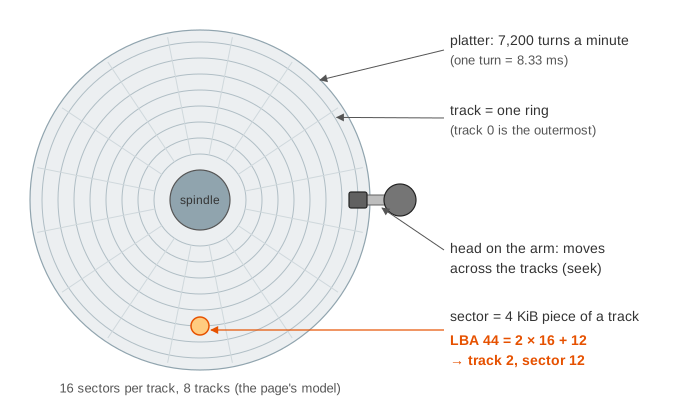
The canvas models one small drive: 8 tracks of 16 sectors (4 KiB each) and a spare track for bad sectors. Its clock ticks once per sector passing under the head, so 1 tick = 1/16 of a turn = 0.52 ms. Pick a command and an LBA and press Send, or run a demo. The host side (the command over SATA, the DMA and the interrupt) takes microseconds; it is drawn but not counted.
LBA to track and sector
The operating system sees the disk as a list of blocks numbered 0, 1, 2, … : the logical block address (LBA). The drive maps each LBA to a physical place. In the model the map is simple: LBA = track × 16 + sector, so LBA 0–15 is track 0 (the outermost ring), LBA 16–31 is track 1, and so on. A real drive has several platters with a head on each side, all on one arm, so a "track" there is really a cylinder of tracks above each other. It also puts more sectors on the long outer tracks than on the short inner ones (zoned recording), which is why the start of a disk is faster than its end.
Seek, rotation, transfer
Every access that is not in the drive's cache pays three costs:
- Seek: move the arm to the track. In the model,
2 + |from − to|ticks (1 per track plus 2 to settle). - Rotational latency: wait for the sector to reach the head. Anything from 0 to almost one full turn; half a turn on average.
- Transfer: the sectors pass under the head, 1 tick each.
Demo 1 reads LBA 44 with the head on track 0: seek 0 → 2 is 4 ticks (2.08 ms), the platter has turned 4 slots meanwhile, so sector 12 is 8 ticks away (4.17 ms, exactly the average half turn), and the transfer takes 1 tick (0.52 ms). Total 13 ticks = 6.77 ms for 4 KiB.
| spindle speed | one turn | average rotation | typical average seek |
|---|---|---|---|
| 5,400 RPM (laptop) | 11.1 ms | 5.6 ms | ~12 ms |
| 7,200 RPM (desktop) | 8.33 ms | 4.17 ms | ~8.5 ms |
| 10,000 RPM (server) | 6.0 ms | 3.0 ms | ~4.5 ms |
| 15,000 RPM (server) | 4.0 ms | 2.0 ms | ~3.5 ms |
The model's seeks are short because it has only 8 tracks; a real drive has hundreds of thousands, and a full stroke from the outside to the inside takes about 15 ms.
Sequential vs random I/O
Seek and rotation are paid once per request, however much data follows. A sequential read pays them once and then streams sectors at full speed; a random read pays them every time. In Demo 2 the four sectors LBA 20–23 come in 8 ticks (4.17 ms), while four random sectors (LBA 3, 115, 40, 88) need 65 ticks (33.85 ms): the same 16 KiB, about 8 times slower.
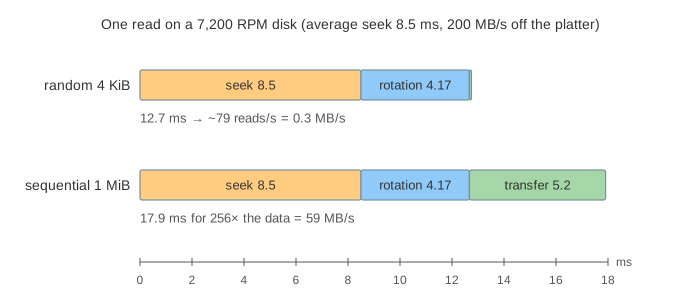
That is why a hard disk manages only 100–200 random reads per second but 150–250 MB/s sequentially, and why storage engines go out of their way to write sequentially: a write-ahead log only appends (WAL and crash recovery), and an LSM tree turns random updates into long sequential runs (LSM tree vs B-tree).
The drive's own cache and NCQ
The drive has its own computer and a DRAM cache (here 8 slots). After a read miss it keeps reading the following sectors of the track for free, because they are passing under the head anyway: read-ahead. In Demo 4 the read of LBA 48 costs 17 ticks (8.85 ms) and brings in LBA 49–52; the next reads of 49 and 50 are cache hits that take no time on the platter.
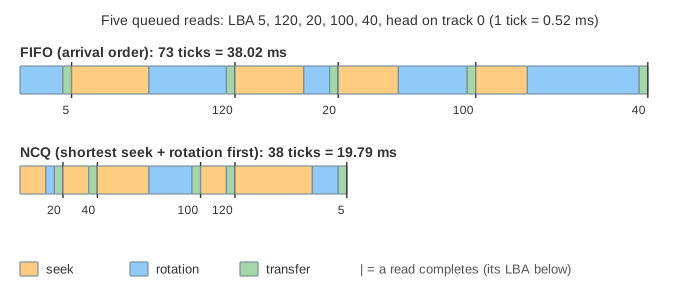
With native command queuing (NCQ) the host may send up to 32 tagged commands (READ FPDMA QUEUED, WRITE FPDMA QUEUED) without waiting, and the drive chooses the order. It knows where the head is and where the platter is, so it can serve the request that is cheapest to reach next (shortest positioning time first), something the operating system cannot do because it does not know the rotation. In Demo 3 the same five reads take 73 ticks (38.02 ms) in arrival order and 38 ticks (19.79 ms) in NCQ order.
"Done" vs on the platter: FLUSH CACHE, FUA and fsync
With the write cache on (the default, hdparm -W1) a write is acknowledged as soon as it sits in a dirty DRAM slot. In Demo 5 three writes are acknowledged in 0.00 ms; the platter has not been touched. The data reaches the platter later, when the cache needs the slot or when the host sends FLUSH CACHE EXT. The flush in Demo 5 writes the three slots in NCQ order (LBA 90, 60, 61) in 30 ticks (15.63 ms).
DRAM forgets everything when the power goes. Demo 6 writes LBA 60 and 61, cuts the power, and both writes are gone although the application was told they were done: the platter still holds D13 and D14. A write with the FUA bit (force unit access) is acknowledged only after it is on the platter (13 ticks, 6.77 ms), so it survives the next power cut. That is why fsync() does not stop at the page cache: the kernel ends it with a cache flush or uses FUA writes (see How a File System Survives a Crash). Switching the write cache off makes every write wait for the platter, which is safe and slow.
ECC, bad sectors and remapping
Every sector carries an error-correcting code (ECC). When a weak sector fails the check, the drive waits a full turn and tries again (real drives try many times, adjusting the head a little). In Demo 7 the second try succeeds, ECC corrects the bits, and the drive then copies the data to a spare sector and retires the old one. SMART counts this as Reallocated_Sector_Ct; a growing count is a sign the disk is wearing out. The LBA keeps its number, but its data now lives on track 8, so a later "sequential" read of LBA 68–71 has to seek to the spare track and back: 18 ticks of seeking instead of none.
The host side: SATA, AHCI, DMA and the interrupt
The block layer hands a request to the AHCI driver, which writes a command into a command slot in RAM and sets a bit in the controller. The command reaches the drive as a frame (FIS) over the SATA link; the data moves between the drive and RAM by DMA, without the CPU copying it; at the end the drive sends a Set Device Bits FIS and the controller raises an interrupt that wakes the waiting thread. All of this takes microseconds, so on a hard disk the milliseconds belong to the mechanics. An SSD has no arm and no platter, so its reads take tens of microseconds and the host side starts to matter: see How an SSD Reads and Writes Data.
The operating system has its own queue too, and the classic algorithms for ordering it (FCFS, SSTF, SCAN, C-SCAN, LOOK) are compared in Disk Scheduling.
What the page leaves out
Several platters and heads (cylinders), zoned recording with more sectors on outer tracks, track skew (the next track's sector 0 is shifted so a sequential read crossing a track does not lose a turn), shingled (SMR) tracks that must be rewritten in bands, servo wedges that tell the head where it is, the arm's arc (here it moves in a straight line), head flying height and parking, the full ATA command set, error retries beyond one turn, RAID, and the operating system's own I/O scheduler (mq-deadline, BFQ) above the drive.
References
OSTEP, chapter 37: Hard Disk Drives (Arpaci-Dusseau)
Intel: Serial ATA AHCI 1.3.1 specification (NCQ, FIS, command slots)
Linux kernel documentation: explicit volatile write back cache control (flush and FUA)
Hard disk drive performance characteristics (seek, rotational latency, transfer rate)