The idea: write() is a memory copy, fsync() goes all the way down
When a program calls write() on a file, Linux copies the bytes into the page cache in RAM, marks the page dirty and returns. That takes about a microsecond. The disk is written later, by a background thread or when the program calls fsync(). Then the data goes down a stack of layers: the file system finds the disk block, the block layer queues, merges and orders the request, the driver hands a command to the device, and a completion comes back up.
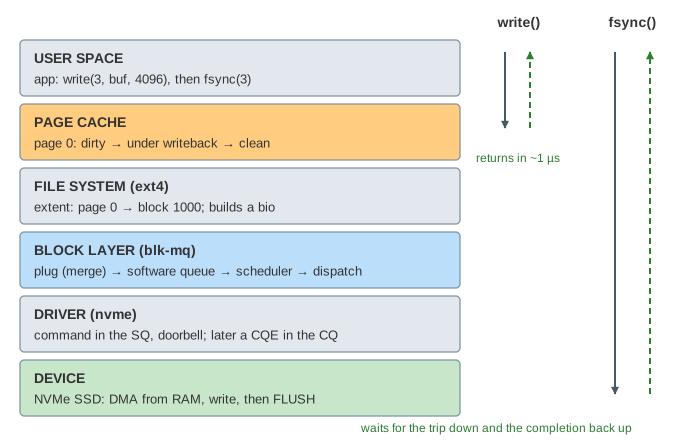
The page follows one process, app, with one file open as fd 3: data.log, four pages of 4 KiB. ext4 has put the pages on disk blocks 1000, 1001, 8000 and 2000. Pick a page and press write(), then fsync() or Writeback, or run a demo. The disk select switches between an NVMe SSD and a hard disk.
write() and dirty pages
write() is a system call that copies from the program's buffer into the file's page in the page cache (copy_from_user), sets the page's dirty flag and returns the byte count. Nothing waits for the disk, which is why write() is fast and why data written a second ago can be lost in a power failure (Demo: write() returns at once). Reads of the same file see the new bytes at once, because they read the same page.
Dirty pages are written back by the flusher threads (kworker, wb_workfn). They wake every vm.dirty_writeback_centisecs = 500 (5 s) and write pages that have been dirty longer than vm.dirty_expire_centisecs = 3000 (30 s). They also start early when dirty memory passes vm.dirty_background_ratio (10%), and a process that writes faster than the disk can take is slowed down inside write() at vm.dirty_ratio (20%). grep Dirty /proc/meminfo shows how much is waiting. The Writeback button runs the flusher: the same path as fsync, but nobody waits for it.
fsync(fd) writes the file's dirty pages itself and sleeps until the device says they are stored. The process is in state D (uninterruptible sleep) meanwhile. How fsync also commits the journal so that the file's metadata survives a crash is on How a File System Survives a Crash.
From file page to bio
The file system knows where each page of the file lives on disk. ext4 keeps an extent tree per inode: runs of file pages that sit on consecutive disk blocks. ext4_writepages() marks the dirty pages under writeback (they stay readable, and a new write waits or makes a copy), looks up their blocks and builds a bio for each piece: the operation (write), the start sector, and a list of pages in RAM. The bio points at the page; the data is not copied. submit_bio() hands it to the block layer. On this page each page gets its own bio, so that the block layer's merging is visible; ext4 often puts several consecutive pages in one bio itself.
blk-mq: plug, software queue, dispatch queue
Since Linux 5.0 every block device uses blk-mq, the multi-queue block layer. A request travels through a few queues on its way to the driver:
| Stage | What it is | What happens there |
|---|---|---|
| plug list | per task, between blk_start_plug() and blk_finish_plug() | bios collect for a moment; a bio that continues the previous one is merged into its request |
| software queue | one per CPU (blk_mq_ctx) | CPUs submit without sharing one lock |
| I/O scheduler | per device: none, mq-deadline, bfq, kyber | may hold and reorder requests |
| hardware dispatch queue | one per hardware queue (blk_mq_hw_ctx, hctx) | queue_rq() hands each request to the driver |
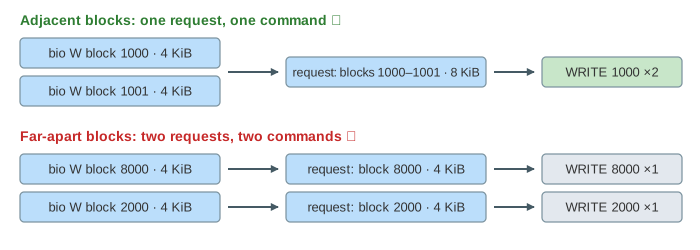
A request (struct request) is what the driver turns into one device command. It holds one or more bios for consecutive sectors. When page 1's bio starts at block 1001, right where page 0's bio ends, the block layer appends it to page 0's request (a back merge): one 8 KiB command instead of two 4 KiB ones (Demo: two adjacent writes merge).
The I/O scheduler: none vs mq-deadline
cat /sys/block/nvme0n1/queue/scheduler shows the choices with the active one in brackets, for example [none] mq-deadline. Writing a name to the same file switches it.
| Scheduler | Order | Usual device |
|---|---|---|
none | as they come (FIFO), no extra work | NVMe SSDs: no head, many hardware queues |
mq-deadline | sorted by sector in one direction; each request also gets a deadline (reads 500 ms, writes 5 s) so none starves | hard disks, SATA SSDs |
bfq | fair shares per process | desktops with slow disks |
On a hard disk the order matters because the head has to move. With none, the requests for blocks 1000, 8000, 2000 go out in that order and the head swings back and forth: 6 + 12 + 11 ms. mq-deadline sorts them to 1000, 2000, 8000: 6 + 6 + 11 ms (Demo: mq-deadline vs none on a hard disk). The classic algorithms behind this sorting are on Disk Scheduling.
The driver and the device
The NVMe driver's nvme_queue_rq() writes a 64-byte command into the submission queue (SQ), a ring in RAM: opcode WRITE, start block, number of blocks, and the physical addresses of the pages. Then it writes the new tail index into the drive's SQ tail doorbell register. The drive fetches the command and reads the data out of the page cache by DMA; the CPU does not copy it. When it is done, the drive writes a completion queue entry (CQE) into the completion queue and raises an MSI-X interrupt. nvme_irq() reads the CQEs, blk_mq_complete_request() ends the request, bio_endio() runs the bio's callback, and end_page_writeback() clears the page's flag: it is clean. What the SSD does with the data inside is on How an SSD Reads and Writes Data.
A SATA hard disk has the same shape with other names: the ahci driver puts the command in a command slot and sets a bit in the PxCI register, and the disk interrupts when it is done (see How a Hard Disk Reads and Writes Data). On this page the hard disk takes one command at a time; a real one queues up to 32 with NCQ and reorders them itself.
fsync() and the cache flush: what it costs
A drive may report a write done while the data is still in its own volatile cache. So after the data writes, fsync() sends one more command, a FLUSH (the block layer's REQ_PREFLUSH), and returns only when that completes too. With the numbers of this page's model:
| Operation | NVMe SSD | hard disk |
|---|---|---|
| write() of 4 KiB | 1 µs | 1 µs |
| one write command | 20 µs | 4 ms rotation + 1 ms + seek |
| FLUSH | 10 µs | 2 ms |
| fsync() of one page | 30 µs | 8 ms or more |
So the same four write() calls take 4 µs on any disk, but the fsync() after them takes 25 ms on the hard disk (Demo: slow disk). That is why databases group many commits into one fsync, and why a slow or busy disk shows up as processes stuck in state D. iostat -x shows each device's queue size and wait time (w_await); biolatency from bcc draws the latency histogram.
What the page leaves out
The page has one file, one CPU and one hardware queue; a real NVMe drive gets one queue pair per CPU. It skips the journal commit of fsync (jbd2), read requests and read-ahead, direct I/O (O_DIRECT, which skips the page cache), io_uring, front merges, request splitting at max_sectors_kb, tags and queue depth limits, timeouts and retries, device mapper and RAID layers (which split and remap bios), the bfq and kyber schedulers, writeback throttling (wbt), cgroup I/O limits, NCQ and the FUA flag. The CPU time of each layer, a few microseconds in all, is left out of the clock.