The idea: the diagram is the design, the tables are what gets stored
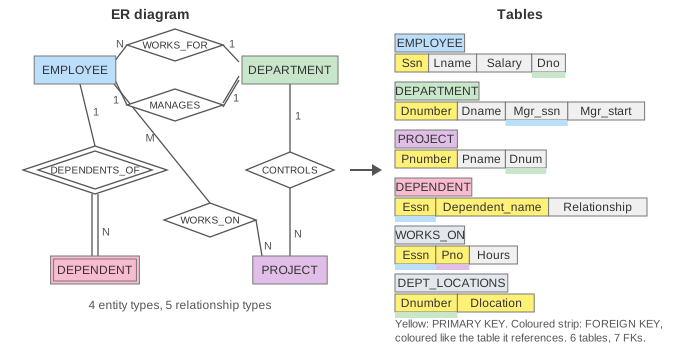
An entity-relationship (ER) diagram describes the data in words a person can check: the things (entity types, boxes), how they are connected (relationship types, diamonds) and their attributes. A relational database stores only tables. The ER-to-relational mapping turns one into the other with a fixed set of rules, so it is the first design step after the diagram. Every rule answers one question: where does the key go? The canvas runs the rules on part of the book's COMPANY database (Elmasri & Navathe, chapter 9): 4 entity types and 5 relationship types become 6 tables with 7 foreign keys.
The six steps
| Step | ER element | Becomes | On the canvas |
|---|---|---|---|
| 1 | regular entity type | a table; the key attribute is the PRIMARY KEY | EMPLOYEE, DEPARTMENT, PROJECT |
| 2 | weak entity type | a table with the owner's key; PK = owner key + partial key | DEPENDENT(Essn, Dependent_name, …) |
| 3 | 1:1 relationship | a foreign key on one side, best the total side | DEPARTMENT.Mgr_ssn, Mgr_start |
| 4 | 1:N relationship | a foreign key on the N side | EMPLOYEE.Dno, PROJECT.Dnum |
| 5 | M:N relationship | a new table with both keys; together they are the PK | WORKS_ON(Essn, Pno, Hours) |
| 6 | multivalued attribute | a new table: owner key + value, both in the PK | DEPT_LOCATIONS(Dnumber, Dlocation) |
The order matters: a foreign key can only point at a table that already exists, so entity types come first and relationships after (Demo: map the whole diagram, steps 1 to 6). On the canvas a key that is copied flies as a blue box from the primary key it comes from to its new column.
Entity types and weak entity types
A regular entity type becomes a table with one column per simple attribute. Its key attribute (shown in yellow) becomes the PRIMARY KEY: Ssn for EMPLOYEE, Dnumber for DEPARTMENT, Pnumber for PROJECT. A composite attribute would be split into its parts; a multivalued attribute can't be a column at all and waits for step 6.
A weak entity type (double box) has no key of its own, only a partial key. Wong and Smith both have a daughter called Alice, so Dependent_name alone can't identify a row. The table takes the owner's key through the identifying relationship (double diamond): PRIMARY KEY (Essn, Dependent_name), with Essn a foreign key to EMPLOYEE. ON DELETE CASCADE fits, because a dependent can't exist without the employee. With Dependent_name alone as the key, MariaDB refuses the second Alice with ERROR 1062 Duplicate entry 'Alice' for key 'PRIMARY' (Demo: weak entity borrows the owner's key).
Relationships: where the foreign key goes
The cardinality ratio on the diagram decides it. The rule of thumb: put the key where each row needs exactly one value.
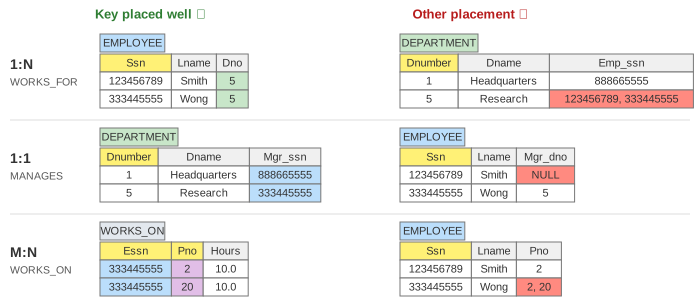
- 1:N (WORKS_FOR, CONTROLS): the key of the 1 side goes into the N side. Each employee works for one department, so EMPLOYEE gets
Dno. Put it the other way round and Research needs two Ssns in one cell, which breaks first normal form (Demo: 1:N puts the key on the N side). - 1:1 (MANAGES): either side works, but choose the side with total participation (double line): every department has a manager, so
DEPARTMENT.Mgr_ssnis never NULL. On the EMPLOYEE side, every employee who manages nothing gets NULL: 5 of the book's 8 employees (Demo: 1:1 puts the key on the total side). If both sides are total, the two tables can also be merged into one. - M:N (WORKS_ON): no side works. Wong works on 2 projects and ProductY has 2 employees, so either column would need a list. A new relationship table holds one row per pair, with both keys as foreign keys and together as the primary key (Demo: M:N gets a table of its own).
A relationship's own attributes travel with it: Start_date of MANAGES goes next to Mgr_ssn in DEPARTMENT, and Hours of WORKS_ON goes into WORKS_ON, because hours belong to an (employee, project) pair. A 1:1 or 1:N relationship can also get its own table (the "cross-reference" option), which is useful when few rows take part and the foreign key would be mostly NULL.
Multivalued attributes
Research is in Bellaire and in Houston. A cell holds one value, so {Locations} becomes its own table DEPT_LOCATIONS(Dnumber, Dlocation) with one row per location, and the primary key is both columns. Storing 'Bellaire, Houston' in one column would make it impossible to index, join or check, and repeating the DEPARTMENT row per location would copy Dname and the manager (Demo: multivalued attribute gets a table of its own).
The schema in MariaDB
The DDL panel shows what each step writes. EMPLOYEE and DEPARTMENT point at each other (Dno and Mgr_ssn), so one of the two foreign keys can only be added after both tables exist; that is why steps 3 and 4 use ALTER TABLE … ADD FOREIGN KEY. In MariaDB with InnoDB, foreign keys are checked on every write: deleting Smith while WORKS_ON still has his rows fails with ERROR 1451 Cannot delete or update a parent row, while the DEPENDENT rows of a deleted employee go with it, thanks to ON DELETE CASCADE. InnoDB also creates an index on each foreign key column that has none (here on WORKS_ON.Pno), so these checks and joins stay fast.
See also Database Normalization for checking the tables afterwards with functional dependencies, Relational Algebra for joining them back together, Join Algorithms for how a join on a foreign key runs, and MariaDB Table Elimination for how a unique key lets MariaDB skip a join.
What the page leaves out
Step 7 of the algorithm, n-ary relationships (a table with the keys of all n sides), and the mapping of specialization and generalization (one table per class, one table for all, or subclass tables only) and of union types. Composite attributes, and derived attributes such as Number_of_employees, which are usually not stored. The real COMPANY schema has more columns (Fname, Minit, Bdate, Address, Sex), the SUPERVISION recursive relationship and more rows; the page keeps three employees and two departments so every cell can be checked. Choosing data types, NOT NULL and ON UPDATE actions is part of physical design and is only sketched in the DDL.
See where this page fits on the Databases & Storage mind map.