The idea: one hop at a time
A router does not know the whole path to a destination. For each packet it answers one question: which neighbour gets it next, and through which interface? The next router answers the same question again, and so on until the packet reaches a network the destination is on. This is hop-by-hop forwarding.
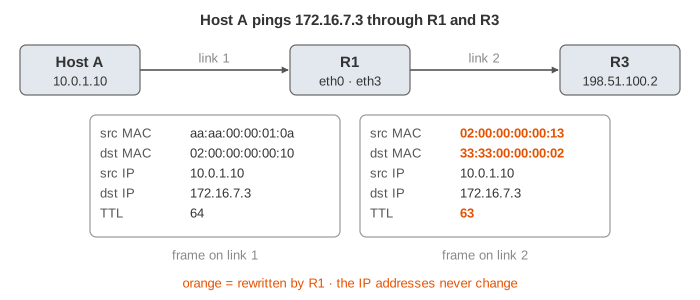
The canvas shows one router, R1, with four interfaces. On the left are two LANs: Host A on
eth0 and Host B on eth1. On the right are two next-hop routers: the ISP's router R2 on
eth2 (the way to the Internet) and the branch office's router R3 on eth3, over a VPN tunnel
with a smaller MTU of 1400 bytes. Host A sends pings, and you follow each one through R1's stations,
its forwarding table and its ARP cache. The header table shows the packet as it arrived
and as it leaves; fields the router changed are orange.
What happens to one packet inside the router
- L2 receive. The frame's destination MAC must be the interface's own MAC (or broadcast), and the Ethernet FCS must be correct. Then the Ethernet header is removed.
- IP checks. Version 4, a sane header length, and the header checksum. A packet addressed to one of the router's own IPs is not forwarded: it goes up to the router's CPU (Demo 9).
- TTL. If the TTL is 1 or less, forwarding would make it 0, so the packet is dropped (Demo 4).
- Forwarding table lookup. Longest prefix match picks the route: next hop and outgoing interface.
- MTU. The packet must fit the outgoing link. If it doesn't and DF is set, it is dropped (Demo 5).
- ARP. The router finds the next hop's MAC address, asking with ARP if it has to (Demo 3).
- Rewrite. TTL − 1, new header checksum, new Ethernet header: source MAC = the outgoing interface, destination MAC = the next hop. Then the frame is queued on the interface and sent.
Because the TTL is part of the header, every hop must fix the checksum. The page computes the real RFC 791 sum: taking
1 off the TTL raises the checksum by exactly 0x0100 (TTL 64 → 63 turns 0x034a into 0x044a
in Demo 1), so routers update it incrementally instead of summing the whole header again (RFC 1624).
The router keeps no state about the packet afterwards. Every packet of the same flow goes through the same steps again (real routers cache the result, but the answer is the same).
Longest prefix match
A route is a prefix: an address and a length, like 172.16.0.0/16, which means "every
address whose first 16 bits are those of 172.16.0.0". A destination matches a row when destination AND mask
equals the prefix. Several rows can match. The router picks the most specific one, the one with the
longest prefix. That is how a small exception (172.16.5.0/24 is reached through the ISP) can sit inside a
bigger route (172.16.0.0/16 goes to the branch office) without any order or priority between them.
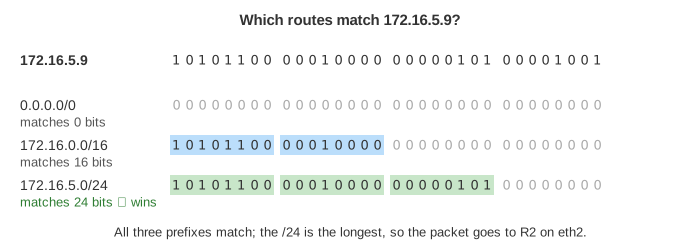
The default route 0.0.0.0/0 has a mask of zero bits, so it matches every address, and
it only wins when nothing else does. Demo 1 uses it; Demo 2 sends to 172.16.5.9 (the
/24 wins over the /16) and then to 172.16.7.3 (only the /16 and the default match, the /16 wins).
A real router cannot compare the destination with a million routes one by one. Software routers use a binary trie (Linux uses an LC-trie): walk the destination's bits from the left and remember the last node that held a route. See Trie for the data structure. Hardware routers use TCAM, memory that compares a key with every stored prefix in parallel in one clock cycle.
From next-hop IP to MAC address
The route gives a next-hop IP address, but Ethernet delivers frames by MAC address. The router looks the next hop up in its ARP cache. On a miss it does not drop the packet: it parks it in a small queue, broadcasts an ARP request ("who has 10.0.2.20? tell 10.0.2.1"), and sends the packet when the reply fills the cache (Demo 3). The second packet finds the entry and needs no ARP.
For a connected route (the destination is on one of the router's own networks) there is no next-hop router: the next hop is the destination itself. If no host has that address, nobody answers. Linux sends 3 requests, one second apart, then gives up and reports the failure to the sender (Demo 6).
When forwarding fails: ICMP errors
The router tells the sender why a packet died with an ICMP message from its own address. The table lists the cases this page shows.
| Cause | ICMP type / code | What ping prints | Demo |
|---|---|---|---|
| TTL would reach 0 | 11 / 0 Time Exceeded | Time to live exceeded | 4 |
| no matching route | 3 / 0 Net Unreachable | Destination Net Unreachable | 7 |
| ARP got no answer | 3 / 1 Host Unreachable | Destination Host Unreachable | 6 |
| too big for the link, DF set | 3 / 4 Fragmentation Needed (with the MTU) | Frag needed and DF set (mtu = 1400) | 5 |
| bad header checksum | none: dropped silently | nothing (timeout) | 9 |
traceroute uses the first row on purpose: it sends packets with TTL 1, 2, 3 … and each router where the TTL runs out answers with Time Exceeded, which reveals its address. Path MTU Discovery uses the last one: hosts set DF, and when a router answers "Fragmentation Needed, MTU 1400", the host remembers 1400 for that destination and sends smaller packets. A firewall that blocks all ICMP breaks this: big packets vanish while small ones work (a "PMTU black hole").
Where the table comes from: RIB and FIB
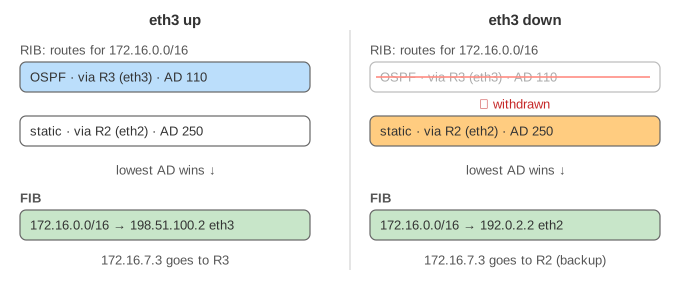
Routes come from several sources: connected networks (each interface's own subnet), static routes typed by an admin, and routing protocols such as OSPF (inside one organisation) and BGP (between networks). All of them go into the RIB (routing information base). When two sources offer the same prefix, the one with the lowest administrative distance wins, and only the winner is installed in the FIB (forwarding information base), the table the data plane reads for every packet.
| Source | Administrative distance (Cisco defaults) |
|---|---|
| connected | 0 |
| static | 1 |
| eBGP | 20 |
| OSPF | 110 |
| RIP | 120 |
| iBGP | 200 |
R1 learns 172.16.0.0/16 from R3 by OSPF (distance 110) and also has a floating static route to the
same prefix through the ISP with distance 250, deliberately worse. While the tunnel is up the static route stays in the RIB only.
When eth3 goes down, OSPF withdraws its route, the static route becomes the best one, and the FIB switches to it.
When the link comes back, OSPF wins again (Demo 8).
Control plane and data plane
The control plane runs on the router's CPU: routing protocols, the RIB, ARP replies, answering pings to the
router itself, building ICMP errors. The data plane moves packets: on a hardware router it is an ASIC that
does the stations above at line rate, many millions of packets per second, and only hands the unusual packets (for the router, TTL
expired, ARP needed) to the CPU. On Linux both run in the kernel; ip route shows the table and
ip neigh the ARP cache. See Internet Protocol Layers for the same packet across
the whole stack, and How NAT Shares One Public Address for a home router that also rewrites addresses.
See also Anycast and BGP: where the routes in the table come from, and how one prefix announced from three cities sends each user to a different site.
See also IPv4 vs IPv6: IPv6 routers skip the header checksum and never fragment.
See also: a router next to a hub and a switch on the same traffic, and why only the router splits broadcast domains, in Hub vs Switch vs Router.
See How Traceroute Finds the Routers on a Path for the probes, the replies and the * * * lines animated.
See also: a router with one trunk port and a subinterface per VLAN, routing between VLANs, in VLANs: One Switch, Several Networks.
What the page leaves out
- IPv6: no header checksum, the Hop Limit replaces TTL, routers never fragment, and NDP replaces ARP.
- ECMP (several equal-cost routes, one picked per flow by a hash), queues, QoS and tail drop on a busy interface.
- Access lists, firewalls, NAT and uRPF (dropping packets with a spoofed source) that a real router also applies.
- How OSPF and BGP actually compute their routes, and BGP's own best-path rules.
- ARP entries ageing out, and fragmentation of packets without DF.
- Interfaces here are point-to-point to one neighbour; the reply packets are not animated.