The idea: follow the light backwards
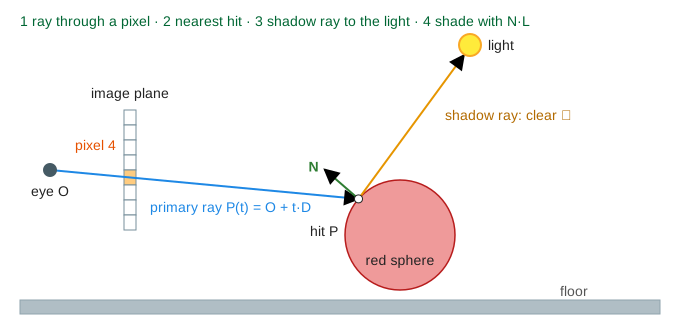
In the real world, light leaves a lamp, bounces off things and a tiny part of it reaches your eye. Ray tracing runs that story backwards. For every pixel of the image it sends a ray from the eye through that pixel into the scene, finds the first thing the ray hits, and then asks how much light reaches that point. The page draws a side view: one vertical slice of a 3D scene, with a column of 8 pixels.
One ray per pixel
A ray is a start point and a direction: P(t) = O + t·D, where O is the eye, D is a unit vector toward the pixel centre and t is the distance walked along the ray. Pixel i of the page has its centre at y = 50.5 − 3i on the image plane x = 22, so its primary ray from O = (6, 40) has the direction (16, y − 40), normalised. The outer loop of a ray tracer is just for each pixel: colour = trace(ray through pixel). Pixels don't depend on each other, which is why ray tracing spreads so well over many GPU cores (Demo: render all 8 pixels).
Ray–sphere intersection
A point is on a sphere with centre C and radius r when |P − C|² = r². Put the ray in for P: |O + tD − C|² = r². With |D| = 1 that is a quadratic in t: t² + b·t + c = 0, with b = 2·D·(O − C) and c = |O − C|² − r². The discriminant Δ = b² − 4c decides it, just like in Quadratic Equations:
| Δ | Meaning |
|---|---|
| Δ < 0 | the ray misses the sphere |
| Δ = 0 | it just grazes the edge |
| Δ > 0 | it enters at t = (−b − √Δ)/2 and leaves at (−b + √Δ)/2; the smaller positive t is the visible hit |
The floor y = 0 is even easier: t = −Oy/Dy, a miss when the ray goes up. The ray is tested against every object and the nearest hit (smallest t > 0) wins, because that surface hides the ones behind it. Pixel 4's ray hits the red sphere at t = 58.5 (Demo: ray hits the red sphere); pixel 0's ray finds no Δ ≥ 0 and leaves the scene, so the pixel gets the sky colour (Demo: ray misses (sky)).
Shadow rays and shading
At the hit point P the tracer needs the normal N (for a sphere, (P − C)/r) and the direction L to the light. Their dot product N·L is the cosine of the angle between them (see Vectors and Dot Product). Lambert's law says a matte surface is as bright as that cosine. The page uses brightness = 0.25 (ambient) + 0.75 × max(0, N·L).
First, though, a second ray, the shadow ray, goes from P toward the light. If it hits any object before the light, P is in shadow and gets only the ambient 0.25. Pixel 7's ray lands on the floor at (67, 0); the shadow ray from there runs into the red sphere, so the floor there is dark (Demo: floor point in shadow). When N·L ≤ 0 (pixel 5, the underside of the red sphere) the surface faces away from the light and no shadow ray is needed.
A reflection bounce
A mirror has no colour worth shading. Instead the tracer spawns a reflected ray from the hit point with direction R = D − 2(D·N)N: the incoming direction with its part along the normal flipped (the same idea as a reflection matrix). That ray is traced exactly like a primary ray, so trace calls itself. Pixel 3's ray hits the mirror at (88.1, 47.7), the reflected ray goes down and left and hits the lit side of the red sphere at (78.4, 32.5), so pixel 3 shows red: you see the sphere in the mirror (Demo: mirror, one reflection bounce). The page mixes 0.85 × reflected colour + 0.15 × grey tint and stops after 2 bounces, so two facing mirrors can't loop forever.
| Pixel | Primary ray hits | Extra rays | Result |
|---|---|---|---|
| 0, 1 | nothing | none | sky |
| 2 | mirror | reflected ray → sky | sky seen in the mirror |
| 3 | mirror | reflected ray → red sphere, its shadow ray is clear | red seen in the mirror |
| 4 | red sphere, N·L = 0.80 | shadow ray clear ✓ | bright red |
| 5 | red sphere, N·L = −0.12 | none (faces away) | dark red |
| 6 | floor, N·L = 0.96 | shadow ray clear ✓ | lit floor |
| 7 | floor | shadow ray blocked ✗ | floor in shadow |
The whole 8-pixel image takes 14 rays: 8 primary, 4 shadow and 2 reflected.
Ray tracing vs rasterization
Most real-time graphics (games, the browser drawing this page) uses rasterization instead. It turns the loops around: for each object: for each pixel it covers. Each object is projected onto the image plane (the divide by distance of Perspective Projection), the pixels inside its outline are filled, and a z-buffer keeps, per pixel, the depth of the nearest surface drawn so far. A new surface writes a pixel only if it is nearer. On the page the floor writes pixel 5 first (z = 147.7), then the red sphere overwrites it (z = 54.1) (Demo: rasterization vs ray tracing).
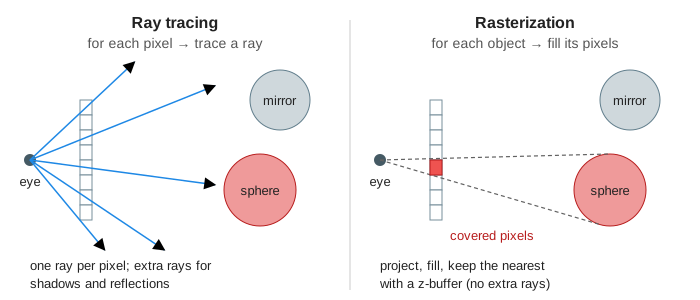
Each object only ever looks at its own pixels, so a rasterizer cannot ask "is the light blocked?" or "what does the mirror reflect?". In the comparison 3 of the 8 pixels differ: pixels 2 and 3 (the mirror is drawn as flat grey) and pixel 7 (the floor is lit, no shadow). Rasterized engines add those effects with extra passes such as shadow maps and reflection probes; ray tracing gets them from the same ray query it already has. A separate Rasterization page will show the triangle-filling side in detail.
| Ray tracing | Rasterization | |
|---|---|---|
| Outer loop | pixels | objects (triangles) |
| Visibility | nearest t along the ray | z-buffer depth test |
| Shadows, reflections | one more ray each | extra passes and tricks |
| Cost grows with | pixels × rays per pixel (plus a search structure over objects) | number of triangles and covered pixels |
| Typical use | film, offline rendering, RTX effects in games | real-time games, UIs |
See also Lens Ray Diagram for rays in optics, which follow light forwards from the object.
What the page leaves out
The scene is a 2D slice with 8 pixels and two spheres; a real renderer works in 3D with triangles and millions of rays. It skips acceleration structures (bounding volume hierarchies, which keep a ray from testing every object), several rays per pixel for anti-aliasing, soft shadows from area lights, refraction through glass, specular highlights, colour per channel of light, and path tracing, which follows many random bounces to get indirect light. The rasterization side skips triangles, clipping and interpolation across a triangle.