The idea: who handles the input, and who updates the screen
A screen with a form needs three kinds of code: the Model (the data and the rules: a cart with a quantity, a price and a total), the View (the widgets the user sees), and some glue that turns clicks and key presses into Model changes and Model changes back into pixels. MVC (Model–View–Controller) and MVVM (Model–View–ViewModel) are two ways to write that glue. The page runs the same input through both: MVC on the left, MVVM on the right. The cart starts at qty 2 × $12 = $24.
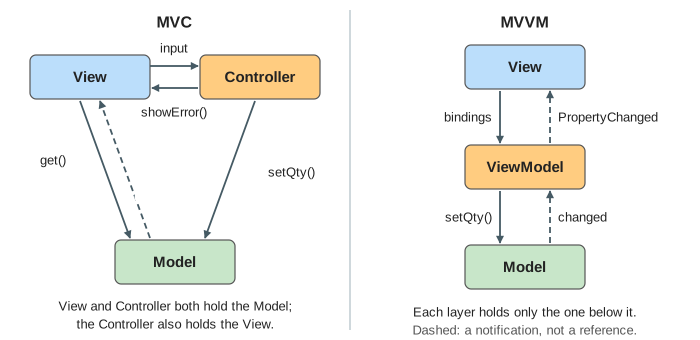
Each box on the canvas turns orange while it runs code and shows the line it runs. The Path line under each panel lists the layers the input visited and counts the messages.
MVC: the Controller routes input
In MVC (Trygve Reenskaug, Smalltalk-80) the View draws and the Controller handles input. A click on + is not handled by the button: the View passes the event to its Controller, which decides what it means and calls model.setQty(3). The Model knows nothing about screens. It keeps a list of observers and calls notify() after every change. The View is one of those observers: it gets changed, calls model.get() and redraws itself from the answer (Demo 1: a click through each layer: 5 messages, qty 3, total $36).
class CartController {
    onPlus()           { model.setQty(model.qty + 1); }
    onQtyChange(text)  { const n = parse(text);
                         if (n === null) view.showError("not a number");
                         else model.setQty(n); }
}
class CartView {   // an observer of the model
    update() { const s = model.get(); field.value = s.qty; totalLabel.text = "$" + s.total; }
}
So the View knows the Model (it reads it), and the Controller knows both the View and the Model. Web frameworks such as Rails, Django and Spring MVC keep the name but change the shape: there the Controller receives an HTTP request, calls the Model and picks a template; the View does not observe anything.
MVVM: the ViewModel binds
In MVVM (John Gossman, WPF, 2005) the View has no handler code. It declares bindings to a ViewModel: the field's value to the property qtyText (two-way), the total label to total, the button's click to the command increment. A framework part called the binder does the copying. The ViewModel calls the Model, updates its own properties when the Model says changed, and raises PropertyChanged. It never holds a reference to a widget.
<input value="{{qtyText}}" />  <button (click)="increment()">+</button>  total: {{total}}

class CartViewModel {
    qtyText; total; error;
    increment()         { model.setQty(model.qty + 1); }
    set qtyText(text)   { const n = parse(text);
                          if (n === null) this.error = "not a number";   // raises PropertyChanged
                          else model.setQty(n); }
    onModelChanged()    { this.qtyText = String(model.qty); this.total = model.total; }
}
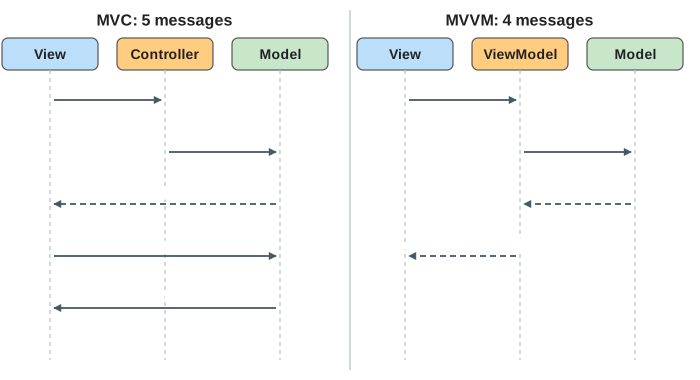
In Demo 2: typing a quantity the user types 5. On the left the View fires a change event and the Controller parses it. On the right the two-way binding writes qtyText = '5' straight into the ViewModel. Both end at qty 5, total $60; MVC used 5 messages, MVVM 4.
Invalid input
Demo 3: invalid input is rejected types abc. The rule "a quantity is a whole number" belongs to the glue, not to the widgets and not to the Model. In MVC the Controller rejects the text and calls view.showError(), which is why the Controller needs the View. In MVVM the ViewModel sets its error property; the binder shows it in the error label. In both cases the Model still has qty 2, and only 2 messages were sent.
A change that starts in the Model
Not every change comes from the user. In Demo 4: the Model changes on its own a price update from the server sets the price to $10. In MVC the Controller is not involved at all: the Model notifies the View, which pulls and redraws (3 messages). In MVVM the Model notifies the ViewModel, which recomputes total and raises PropertyChanged (2 messages). The total becomes 2 × $10 = $20 on both screens.
Which one?
| MVC | MVVM | |
|---|---|---|
| input goes to | the Controller, through event handlers | the ViewModel, through bindings and commands |
| the screen is updated by | the View, which reads the Model | the binder, from ViewModel properties |
| who knows the View | the Controller | no one |
| unit-testing the screen logic | needs a View or a fake one | call the ViewModel, check its properties |
| needs | nothing special | a binding framework |
| found in | Smalltalk, Cocoa (UIKit), Rails, Spring MVC | WPF, Xamarin/MAUI, Knockout, Vue, Android ViewModel with data binding |
MVVM pays for its binder: the wiring is invisible in the code, and a wrong binding fails at run time, often silently. MVC is easier to follow in a debugger but puts more code in the Controller and the View. For a small screen either works; MVVM pays off when many widgets show the same state and the screen logic needs tests.
See also the Observer Pattern vs Publish–Subscribe, the notification mechanism under both changed and PropertyChanged, and Virtual DOM Diffing, how React updates the screen from state without bindings. Hexagonal Architecture applies the same "keep the core free of the UI" idea to the whole application.
What the page leaves out
MVP (Model–View–Presenter, where a passive View is driven by a Presenter), web MVC with routing and templates, one-way data flow (Flux, Redux, Elm), several Views on one Model, the Controller selecting the View, dependency injection of the ViewModel, binding converters and validation rules, async commands and loading states, and how the binder finds properties (reflection, proxies, generated code).
See where this page fits on the Software Design mind map.