The idea: a count of tasks, averaged three ways
uptime, top and cat /proc/loadavg all print three numbers, such as
load average: 3.98, 2.54, 1.12. They are not CPU percentages. Every 5 seconds the kernel
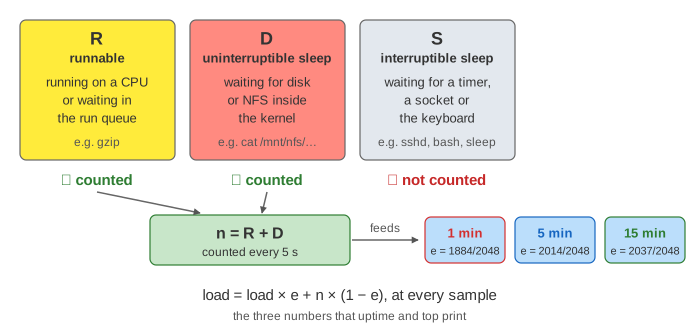
counts tasks: the ones that are running or waiting for a CPU (R) plus the
ones stuck in uninterruptible sleep (D), usually waiting for a disk or
a network file system. Then it folds that count n into three running averages, a fast one
("1 minute"), a medium one ("5 minutes") and a slow one ("15 minutes").
The canvas is one small machine. On the left is the task list, as ps shows it, with the
uptime line under it. On the right are the cores with the task each one runs, the
run queue of runnable tasks that wait, and the kernel's three averages. The chart at
the bottom draws n in grey and the three averages in colour, with a brown line at the number of
cores. The clock is simulated: Run Clock shows the first sample of a run step by step and then
fast-forwards.
What is counted: R and D, not S
A task's state is the letter in the STAT column of ps.
| State | Meaning | Example on the canvas | In the load? |
|---|---|---|---|
R | running on a CPU, or runnable and waiting in a run queue | gzip | ✓ |
D | uninterruptible sleep: waiting inside the kernel for I/O that must not be interrupted | cat on a hung NFS mount | ✓ (Linux only) |
S | interruptible sleep: waiting for a timer, a socket, the keyboard | sshd, bash, sleep 600 | ✗ |
A busy server can have hundreds of processes and a load of 0.3, because nearly all of them sleep in
S. Demo: sleeping tasks don't count starts four sleep tasks and one
gzip: six tasks sleep, and after a minute the load is 0.63, 0.18, 0.06, all
of it from the single gzip.
A waiting runnable task counts as much as a running one. Demo: 4 busy tasks on 4 cores and Demo: the same 4 tasks on 1 core end with the same numbers, 3.98, 2.54, 1.12. On 4 cores every task has a core. On 1 core, one task runs and three always wait, each getting a quarter of the CPU. The load average alone can't tell these apart; you have to know the number of cores.
The formula: every 5 s, a fixed share of the way
Every LOAD_FREQ = 5 s (plus one tick), the timer interrupt calls
calc_global_load(). It adds up nr_running + nr_uninterruptible over all CPUs and
updates avenrun[0..2]:
load = load × e + n × (1 − e)
e = exp(−5 s / 60 s)   ≈ 0.920   (1 min)
e = exp(−5 s / 300 s)  ≈ 0.983   (5 min)
e = exp(−5 s / 900 s)  ≈ 0.995   (15 min)
The kernel has no floating point, so it uses fixed point with 11 fraction bits:
FIXED_1 = 2048 means 1.0, and the constants are EXP_1 = 1884,
EXP_5 = 2014, EXP_15 = 2037. The canvas runs the same integer code as
kernel/sched/loadavg.c and shows the raw avenrun[] values under each box. So at
each sample the 1-minute average moves 8 % of the way from its old value toward n, the
5-minute one 1.7 % and the 15-minute one 0.5 %.
This is an exponentially damped moving average, and "1 minute" is its time constant,
not a window. After one minute of a constant n the 1-minute average has covered only 63 % (1 − 1/e) of
the gap, which is why one gzip shows 0.63 after a minute. It needs about 5 minutes to get
within 1 %. And a spike that ended 3 minutes ago still shows in it.
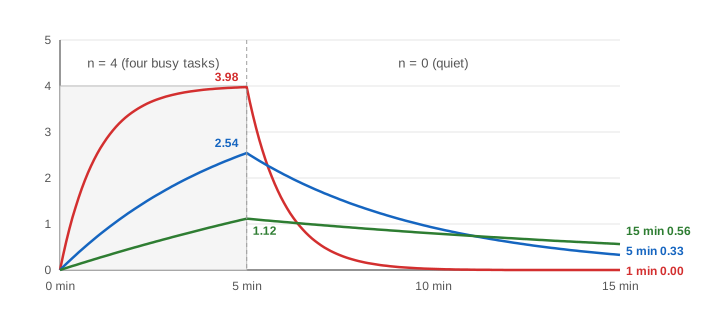
Demo: a burst, then quiet plays this: four gzip for 5 minutes, then nothing for 10.
At 5:00 the load is 3.98, 2.54, 1.12; at 15:00 it is 0.00, 0.33, 0.56.
Reading the three numbers
- Divide by the number of cores (
nproc). Per core below 1: there is spare CPU. Around 1: every core is busy, nobody waits long. Well above 1: tasks wait in run queues and everything gets slower (Demo: the same 4 tasks on 1 core, 3.98 per core). - Compare the three to see the trend. 1 min > 15 min: the load went up recently. 1 min < 15 min: it is going down. Equal: it has been steady for a while.
- It is a count, not a time. A task that runs 1 % of the time but is sampled while running counts 1 at that sample. Very short tasks between samples can be missed.
| Demo | End load | Cores | CPU | Meaning |
|---|---|---|---|---|
| 4 busy tasks on 4 cores | 3.98, 2.54, 1.12 | 4 | 100 % us | busy, nobody waits |
| The same 4 tasks on 1 core | 3.98, 2.54, 1.12 | 1 | 100 % us | 3 tasks always wait |
| NFS server hangs | 3.98, 2.54, 1.12 | 4 | 0 % us, 100 % wa | stuck on I/O, CPUs idle |
| A burst, then quiet | 0.00, 0.33, 0.56 | 4 | idle | falling |
| Sleeping tasks don't count | 0.63, 0.18, 0.06 | 4 | 25 % us | one task for one minute |
The first three rows have the same three numbers and mean three different things. That is the main lesson: look at the CPU line and the task states before you decide what a high load means.
High load, idle CPUs: tasks in D
Linux added D tasks to the count in 1993, so that a machine waiting on a slow disk or a
swapping disk would show its trouble in the load. Most other Unix systems count only runnable tasks.
The effect is that a hung NFS server, a dead iSCSI disk or a thrashing swap device raises the load with
the CPUs idle (Demo: NFS server hangs: four cat in D, load 3.98,
0.0 us and 100.0 wa). A task in D also ignores signals, even
kill -9, until its I/O returns (or, for NFS, until the mount is soft or the
wait is TASK_KILLABLE).
To tell the two kinds of load apart: vmstat 1 shows runnable tasks in column
r and D tasks in column b; ps -eo pid,stat,wchan:30,comm | awk '$2 ~ /D/'
lists the stuck ones and where they wait; and /proc/pressure/cpu and
/proc/pressure/io (PSI) say what share of time tasks were stalled on CPU or on I/O.
More on how runnable tasks share a CPU on CPU Scheduling and
Context Switch, and on the task states on
Process Lifecycle.
What the page leaves out
- Per-CPU counting: each CPU folds its own
nr_runningandnr_uninterruptibleinto a global counter (calc_load_tasks), and NO_HZ idle CPUs are folded in later. - The 10-tick window after
LOAD_FREQin which the sample is taken, and the catch-up code for missed samples. - Threads: Linux counts each thread as a task, so one process with 8 busy threads adds 8.
- CFS time slices, priorities and load balancing between cores (the page just rotates who runs).
TASK_IDLEkernel threads, which sleep in D but are not counted.- Container and cgroup views: the load average is for the whole machine, not per container.