The idea: booting is a relay
When you press the power button, the CPU knows almost nothing. It can't read a file, doesn't know there is a disk, and its RAM isn't even working yet. Booting is a relay: each stage is a small program whose only job is to find, load and start the next, bigger one. The firmware starts the boot loader, the boot loader starts the kernel, the kernel starts the first program, and that program starts everything else.
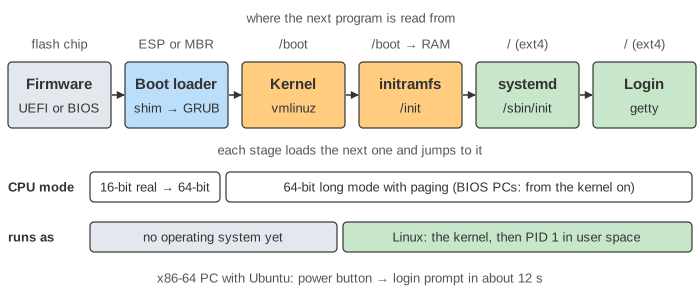
The page follows one x86-64 PC with an NVMe disk running Ubuntu: the firmware, then GRUB, the Linux kernel, the initramfs and systemd. Press Next Stage to go one stage at a time and watch the CPU mode, what lands in RAM, which file is read from which partition, and the processes and services that appear.
Power on and the reset vector
After reset, every x86 CPU starts the same way: in 16-bit real mode, the mode of the 1978 8086, at address 0xFFFFFFF0, 16 bytes below 4 GiB. This is the reset vector. The chipset maps that address to the flash chip on the motherboard, so the first instruction is firmware code, usually a jump further into the firmware.
RAM doesn't work yet: the memory controller has to be set up first. Early firmware runs straight from flash and uses the CPU cache as temporary RAM (cache-as-RAM). The POST (power-on self-test) then trains the memory, finds the devices and starts their drivers.
BIOS vs UEFI
The firmware's last job is to find a boot loader. The old BIOS and the newer UEFI do this very differently.
| Legacy BIOS | UEFI | |
|---|---|---|
| What it loads | sector 0 of the disk (the MBR), 512 bytes, to 0x7C00 | a whole .efi program, a file on a FAT32 partition |
| Where the boot loader lives | 446 bytes in the MBR + core.img in the gap after it | the EFI System Partition (ESP), e.g. \EFI\ubuntu\shimx64.efi |
| How it chooses | boot order in CMOS: first disk with 55 AA at bytes 510–511 | BootOrder and Boot0001… entries in NVRAM |
| Partition table | MBR: 4 partitions, disks up to 2 TiB | GPT: 128 partitions, huge disks |
| CPU mode for the boot loader | 16-bit real mode | 64-bit long mode |
| Secure Boot | no | yes |
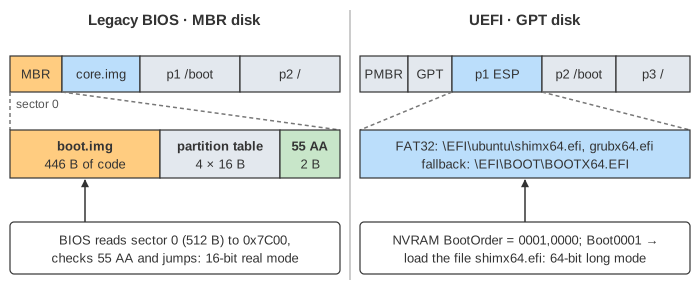
With a BIOS, the 446 bytes of boot code can't read a file system, so GRUB is split in pieces: boot.img in the MBR loads core.img from the sectors right after it, and core.img can read /boot. UEFI has its own FAT32 driver, so the boot loader is just a file. (Demo: legacy BIOS boot; fault: no boot loader on disk shows what each one does when the loader is missing.)
Secure Boot: a chain of signatures
With Secure Boot on, UEFI only runs programs signed by a key in its database, which normally holds Microsoft's key. Linux distributions get a small first-stage loader, shim, signed by Microsoft. shim carries the distribution's own key and checks GRUB with it; GRUB asks shim to check the kernel. Each stage checks the next, so unsigned code never runs before the kernel. (Demo: Secure Boot refuses an unsigned kernel: the same kernel boots with Secure Boot off.)
GRUB: grub.cfg and the kernel command line
GRUB reads /boot/grub/grub.cfg, shows a menu (often hidden) and runs the chosen entry. An entry boils down to two lines:
linux  /vmlinuz-6.8.0 root=UUID=3f1c…a9 ro quiet
initrd /initrd.img-6.8.0
GRUB reads both files into RAM, writes a small structure for the kernel (boot_params, the "zero page": the memory map, and where the command line and the initramfs are) and jumps to the kernel. Everything after the file name is the kernel command line: root= says which disk holds the root file system, ro mounts it read-only at first, quiet hides most messages. If GRUB can't find its own partition it has no config and no modules, and only the grub rescue> prompt is left (Demo: grub.cfg not found).
Inside the kernel: unpack, set up, start PID 1
vmlinuz is a small unpacker plus the compressed kernel. On UEFI it is itself an EFI program (the EFI stub): it gets the memory map and calls ExitBootServices(), after which the firmware's drivers are gone. On a BIOS machine the kernel switches the CPU to 64-bit long mode itself. Then it decompresses the real kernel to 16 MiB, loads its own page tables into CR3 and its own interrupt table.
start_kernel() sets up the rest: the memory map, the interrupt table, the page allocator, the scheduler, interrupts and the timer. At the end, rest_init() creates two kernel threads: PID 1, which will become the first user program, and PID 2 (kthreadd), the parent of all later kernel threads. The code that ran so far becomes PID 0, the idle task that runs when nothing else can. See Linux Context Switch for what the scheduler does with them, and Virtual Memory for the page tables.
Why the initramfs exists
The kernel needs a driver to read the disk, but a distribution kernel keeps most drivers as modules on the disk: a chicken-and-egg problem. The initramfs solves it: a small file system in a cpio archive, loaded by GRUB together with the kernel. The kernel unpacks it into RAM and runs its /init as PID 1. /init loads the drivers this machine needs (nvme.ko, ext4.ko), waits for the disk with the right UUID, checks it and mounts it on /root.
Then switch_root empties the RAM file system, makes /root the new / and runs exec /sbin/init. exec replaces the program but keeps the process (see How Linux Loads and Runs a Program), so systemd starts life as PID 1.
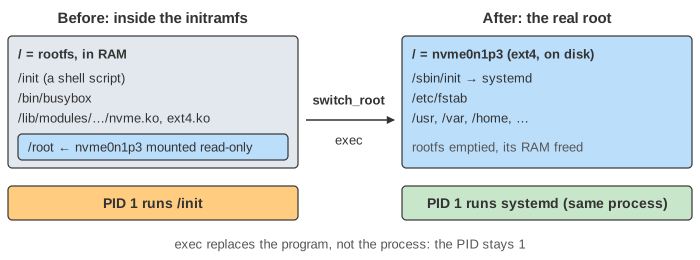
Without the initramfs the kernel tries to mount root= itself. With no built-in NVMe driver there is no such disk, and the kernel panics: VFS: Unable to mount root fs on unknown-block(0,0) (Demo: no initramfs). An initramfs that lacks the right driver fails more gently: /init waits, gives up and opens a shell (Demo: initramfs without the disk driver).
systemd and targets
systemd reads default.target, usually a link to multi-user.target (text login, servers) or graphical.target (desktop). A target is a named group of units. Each unit says what it needs (Requires=, Wants=) and what it must start after (After=). Units with no order between them start in parallel, which is a big part of why modern Linux boots fast. Here: journald, udevd and the file systems from /etc/fstab first; then the network, sshd and the login prompt on tty1 (getty@tty1).
systemd-analyze prints how long each stage took; on UEFI it can read the firmware and boot loader times from EFI variables, on a BIOS it can't. systemd-analyze blame lists the slowest units.
| Stage | Time on this page | Who measured it |
|---|---|---|
| firmware | 3.2 s | the firmware (UEFI variable) |
| loader | 1.1 s | GRUB / systemd-boot (UEFI variable) |
| kernel | 1.4 s | kernel clock, until the initramfs starts |
| initrd | 1.6 s | until switch_root |
| userspace | 4.3 s | until default.target is reached |
How systemd turns unit settings into jobs, what happens when a dependency fails, restarts and socket activation are on systemd Units: Dependencies, Restart and Socket Activation.
When the boot fails
Each stage fails in its own way, so the last message on the screen tells you which stage broke. Pick a fault in the select and press Boot to End.
| What you see | Stage | Usual cause and fix |
|---|---|---|
No bootable device | firmware | no boot sector / no .efi file: reinstall GRUB (grub-install) from a live USB |
bad shim signature | boot loader | unsigned kernel with Secure Boot on: sign it, enroll a MOK key, or turn Secure Boot off |
grub rescue> | boot loader | GRUB can't find its partition: set root=, insmod normal, then reinstall GRUB |
Kernel panic … Unable to mount root fs | kernel | no initramfs, or the root driver is missing: rebuild with update-initramfs -u |
(initramfs) shell | initramfs | root disk not found (wrong UUID, missing driver) or no /sbin/init |
You are in emergency mode | systemd | a bad /etc/fstab line or a failed file system check: fix the line, add nofail |
See also A Linux System Call, Step by Step, Kinds of Interrupts in Linux, File System and Container Internals, which uses the same pivot_root trick as switch_root. systemd stays PID 1 and adopts every orphan on the system; see A Linux Process from fork() to Reaping.
What the page leaves out
One CPU core is drawn; real machines also start the other cores (SMP bring-up) and load CPU microcode early. The page skips ACPI tables, the GRUB menu and its modules, systemd-boot and other boot loaders, encrypted disks (LUKS asks for the password in the initramfs), LVM and RAID, resuming from hibernation, kexec, network boot (PXE), and ARM machines, which use U-Boot and a device tree instead of UEFI. The times are typical values, not measurements.