The idea: hub and spoke, everything goes through the API server
Kubernetes uses a hub-and-spoke pattern. The kube-apiserver is the hub. The kubelet, kube-proxy, the controllers and pods all talk to it, and only to it. No node component calls etcd, the scheduler or the controller manager directly. The apiserver is also the only control-plane component designed to be reached from outside.
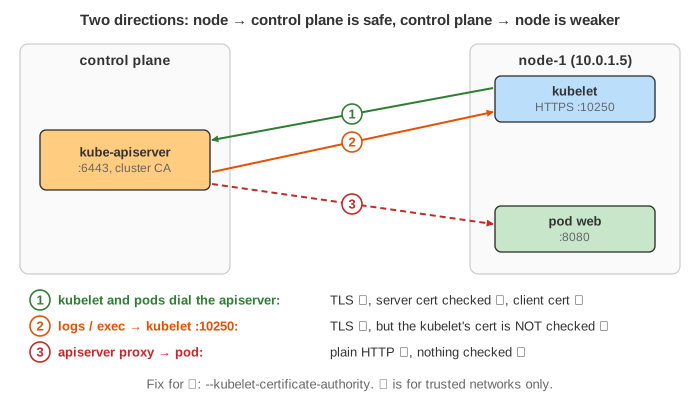
So there are two directions to secure. Node → control plane: the node dials the apiserver. This is secure by default. Control plane → node: the apiserver dials the kubelet or a pod. This is the weaker direction, and it breaks completely when the nodes sit behind a firewall.
The canvas shows the control plane on the left, node-1 on the right and the network between them, where a firewall and an attacker can be switched on in the options. Packets in blue are encrypted (TLS). Packets in pink are plain text that anyone on the path can read. The table under the drawing lists every connection: who dials, whether it is encrypted, whether the listener's certificate is checked and whether the dialer proves who it is.
Node → control plane: HTTPS, client certificates, TLS bootstrapping
The apiserver listens for HTTPS on :6443 (often 443 behind a load balancer). Every client checks the
apiserver's certificate against the cluster CA, and the apiserver authenticates every client.
A new kubelet has no certificate yet. TLS bootstrapping gives it one (Demo 1):
- The kubelet starts with a
bootstrap-kubeconfig: the cluster CA and a short-lived bootstrap token. - It sends a CertificateSigningRequest for
CN=system:node:node-1, O=system:nodes, using the token. - The csrapprover in kube-controller-manager approves it, and the signer signs it with the cluster CA.
- The kubelet stores the certificate and uses it from now on: node status, Lease renewals, watching its pods.
Because the node always checks the server's certificate, an attacker on the path cannot pretend to be the apiserver. All it sees is ciphertext. Connections from nodes to the control plane are safe even over a public network.
Pods: service account token, ca.crt and the kubernetes Service
Each pod gets its service account credentials mounted at /var/run/secrets/kubernetes.io/serviceaccount/:
a bearer token and the cluster ca.crt. It finds the apiserver through the kubernetes Service
in the default namespace, a ClusterIP such as 10.96.0.1:443. kube-proxy rewrites that address to the
apiserver's real endpoint, just as for any other Service (see The Life of an HTTP Request in Kubernetes).
In Demo 2 the connection works and the apiserver knows the caller is system:serviceaccount:default:web. It still
answers 403, because RBAC grants that account nothing. Authentication and authorization are separate steps.
Control plane → kubelet: logs, exec, port-forward
Logs and running containers live on the node, not in etcd. For kubectl logs, exec, attach and
port-forward, the apiserver opens a connection to the kubelet's HTTPS endpoint, port 10250
(Demo 3):
- The apiserver proves who it is with a client certificate (
--kubelet-client-certificate). The kubelet checks it, then asks the apiserver whether that identity may use its API (aSubjectAccessReview, with the kubelet'sauthorization.mode: Webhook). Kubelet authentication and authorization should always be on; otherwise anyone who can reach port 10250 can run commands in your containers. - But by default the apiserver does not check the kubelet's certificate. The connection is encrypted, yet the apiserver cannot tell the real kubelet from an impostor.
That is a man-in-the-middle risk. In Demo 4 an attacker on the network answers for 10.0.1.5. The apiserver
accepts its certificate and sends it the request. The attacker cannot pass the request on as the apiserver (it does not have
the apiserver's key), but it can answer with forged logs. With kubectl exec it would read every command typed. The fix
is --kubelet-certificate-authority: the apiserver then checks the kubelet's serving certificate against a CA, and the
fake one fails with x509: certificate signed by unknown authority (Demo 5). For that, the kubelets need serving
certificates signed by that CA, for example with serverTLSBootstrap: true; the default self-signed kubelet.crt
would fail too.
The apiserver proxy: plain HTTP to nodes, pods and services
The apiserver can proxy a request to a node, a pod or a service, for example
/api/v1/namespaces/default/pods/web:8080/proxy/. The leg from kubectl to the apiserver is HTTPS. The leg from the
apiserver to the pod is plain HTTP: not encrypted, not authenticated (Demo 6). With an https:
prefix in the URL the apiserver encrypts, but it does not check the certificate and sends no credentials, so there is no protection
against someone on the path. The docs call this not safe for untrusted or public networks.
Split networks: SSH tunnels and Konnectivity
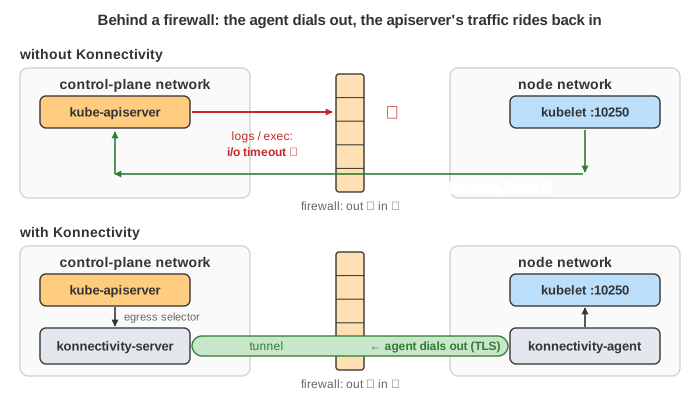
Many clusters put the control plane in one network and the nodes in another: a managed service runs the control plane in the
provider's account, and the nodes sit in yours behind a firewall that allows connections out but not in. Then everything that the
node starts still works: joining, status, pods calling the API. But everything the apiserver starts fails:
dial tcp 10.0.1.5:10250: i/o timeout (Demo 7).
The old fix was SSH tunnels: the apiserver opened an SSH connection to port 22 on each node and sent its traffic through it. They are deprecated. The current fix is the Konnectivity service (Demo 8):
- a konnectivity-server runs in the control-plane network;
- a konnectivity-agent runs on every node (a DaemonSet) and dials out to the server, which the firewall allows, and keeps that connection open;
- the apiserver's egress selector (
--egress-selector-config-file) sends all control-plane → cluster traffic to the server, which sends a dial request down the tunnel; the agent opens the real connection inside the node network.
The traffic inside is the same as before (TLS to the kubelet, plain HTTP for the proxy), but it crosses the network inside the agent's TLS connection, so the attacker in the middle sees nothing readable.
All connections in one table
| Connection | Who dials | Encrypted | Listener's cert checked | Dialer proven |
|---|---|---|---|---|
| kubelet → apiserver | node | yes | yes (CA in kubeconfig) | client cert |
| pod → apiserver | node | yes | yes (mounted ca.crt) | service account token |
| apiserver → kubelet | control plane | yes | no, unless --kubelet-certificate-authority | apiserver client cert |
| apiserver proxy → node / pod / service | control plane | no (https: encrypts only) | no | no |
| konnectivity-agent → server | node | yes | yes | service account token |
The pattern: connections the node starts are fully checked. Connections the control plane starts are the ones to harden or to keep on a trusted network.
What the page leaves out
One control plane host and one node are drawn. Left out: a highly available control plane behind a load balancer; certificate rotation; the kube-scheduler, controller manager and admission webhooks talking to the apiserver; the apiserver → webhook direction; port-forward and attach (they use the same path as logs and exec); and how Konnectivity is configured (gRPC vs HTTP-CONNECT mode, the agent's service account). For the kubelet's side of a pod's life, see The Life of a Kubernetes Pod; for how TLS checks a certificate, see How an HTTPS Connection Is Established.